







When you freelance, your inbox is not a chore that sits next to the work. It is the work. It is where leads land, where scope gets negotiated, where a client's Friday-afternoon panic turns into Monday's invoice. In 2023, 64 million Americans did freelance work, 38% of the entire U.S. workforce (Upwork, Freelance Forward 2023, 2023). Most of them run their client relationships out of a single, overloaded inbox with nobody to cover for them.
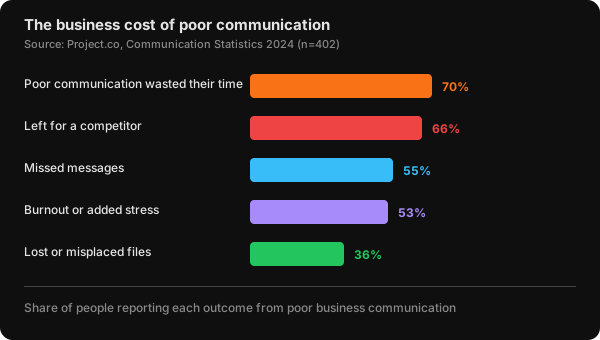
That is the part employees never have to think about. If a salaried worker misses an email, a teammate catches it. If you miss one, a client wonders whether you're still around, and 66% of people have walked away from a business over poor communication (Project.co, Communication Statistics 2024, 2024). For a freelancer, a dropped thread isn't clutter. It's churn.
So Inbox Zero for freelancers isn't about a tidy screen. It's about never letting a client feel forgotten while still protecting the billable hours that pay your rent. This guide shows you how.
Key Takeaways
- For freelancers, missed email is lost revenue: 66% of people have left a business over poor communication, and 55% report missing messages entirely (Project.co, 2024)
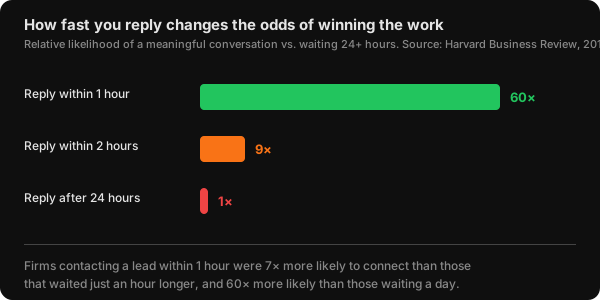
- Speed wins work. Firms replying to a lead within one hour were 7x more likely to have a meaningful conversation than those that waited an hour longer (Harvard Business Review, 2011)
- "Zero" for a freelancer means every client thread has a known state (answered, scheduled, or waiting on them), not an empty inbox
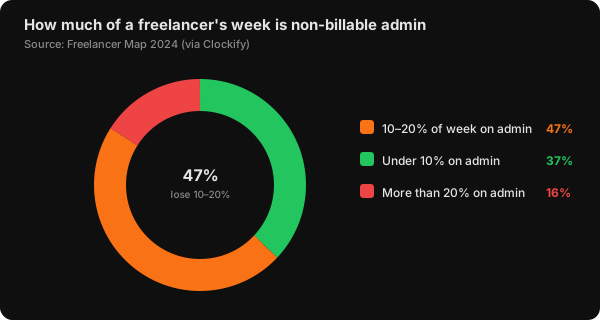
- Admin is eating your week: 47% of freelancers spend 10-20% of their time on non-billable tasks like email (Freelancer Map, 2024). Batching and AI triage claw those hours back
- A 20-minute-a-day routine plus response templates keeps clients feeling prioritized without living in your inbox
If you're just building your first system, start with the complete guide to email management for the foundations. This article assumes you already handle email daily and need the freelancer-and-client adaptation.
Why Does Inbox Zero Matter More for Freelancers Than Employees?
For a freelancer, the inbox is the whole company: sales, support, and delivery in one thread. In 2024, 66% of people said they stopped dealing with a business and moved to a competitor because of poor communication, and 55% said they'd missed messages outright (Project.co, Communication Statistics 2024, 2024). When you're a team of one, there's no colleague to catch the message you dropped.
Think about what a client actually sees. They can't watch you write flawless code or design a beautiful deck. What they experience directly is your email: how fast you reply, whether you remembered the detail from three weeks ago, whether the thread reads like a professional or a scramble. Your communication is the client's evidence of your reliability.
What we've seen: The freelancers who lose clients are rarely the ones who did bad work. They're the ones who went quiet. A client who hasn't heard from you in five days doesn't assume you're heads-down and busy. They assume you've deprioritized them, and they start shopping. A two-line "still on track, here's where things stand" email on day two costs 30 seconds and prevents the silence that kills renewals.
That's the freelancer's asymmetry. A salaried worker's inbox affects their own stress. Yours affects whether the money keeps coming. Our complete email management guide covers the baseline system every professional needs. What follows is what changes when every message is a client relationship.
What Does Inbox Zero Actually Mean for a Freelancer?
Inbox Zero for a freelancer means every client thread has a known state, not that your inbox is visually empty. The state is one of three things: answered, scheduled for a specific time, or waiting on the client. In 2023, attention researcher Gloria Mark found that knowledge workers now look at a single screen for an average of just 47 seconds before switching (Gloria Mark, Attention Span, 2023). An inbox full of undecided threads keeps yanking that fragile attention back.
The original Inbox Zero, coined by Merlin Mann, was never about the message count. It was about reducing the mental weight of unmade decisions to zero. For a freelancer, that weight has a specific shape: "Did I get back to that client? Did I ever send that quote? Is the ball in my court or theirs?" Every one of those open loops is a small tax on your focus.
So redefine the target. A "processed" freelancer inbox might hold ten messages, but each one is tagged and tracked. Nothing is an unanswered question hanging over your afternoon. Isn't that the actual goal, rather than an empty screen you'll refill by lunch?
Our rule: If a client email will sit in your inbox longer than it takes to decide what happens next, it shouldn't be in your inbox. Decide once. Reply now if it's under two minutes, schedule it if it needs real work, or move it to a "Waiting" label if the client owes you the next move. The decision is the work, not the staring.
If your volume is genuinely high, say 100-plus emails a day across many clients, read can you really achieve Inbox Zero with 100+ emails a day for the high-volume mechanics that pair with this freelancer framing.
How Fast Do Clients Actually Expect You to Reply?
Fast, and the data on winning new business is blunt about it. In a landmark 2011 study of 2,241 companies and roughly 1.25 million leads, Harvard Business Review found that firms contacting a lead within one hour were nearly 7x more likely to have a meaningful conversation with a decision-maker than firms that waited just an hour longer, and more than 60x more likely than those who waited 24 hours or more (Harvard Business Review, The Short Life of Online Sales Leads, 2011).
Earlier research by Dr. James Oldroyd found the effect is even sharper at the top: replying within five minutes rather than 30 made a firm around 21x more likely to qualify the lead (Oldroyd, Lead Response Management Study, via LeadAngel, 2007). For a freelancer chasing a new gig, that inquiry sitting unread for a day isn't patience. It's a competitor getting hired.
But new leads and existing clients need different clocks, and confusing them burns you out. A prospect who just filled out your contact form deserves a same-hour reply. An ongoing client on a two-week project does not need you answering at 9 p.m. The fix is setting expectations explicitly.
From experience: The single most powerful line in a freelancer's onboarding email is the response-time promise: "I check email at 9 a.m. and 3 p.m. on weekdays and reply within one business day." Clients almost never object. What they hate is uncertainty, not waiting. Once they know your rhythm, they stop the anxious follow-ups, and you stop feeling like you're always on call. You've turned responsiveness into a system instead of a reflex.
For chasing quotes, proposals, and the replies clients owe you, our guide to handling email follow-ups covers the cadence and timing that triple reply rates.
How Do You Organize Client Email Without Drowning in Folders?
Route every message to a state, not a client. A simple five-label system handles it, and freelancers who lean on structure get real time back: in a 2024 randomized trial of 6,317 employees, Microsoft 365 Copilot users spent 31% less time reading email, roughly 50 minutes saved each week (Microsoft WorkLab, AI Data Drop, 2024). Structure plus automation is where the hours come from.
The five labels that cover a freelance business:
- Action - a client needs a real reply or a deliverable from you. This is your actual to-do list.
- Waiting - you've replied and the ball is in their court. Check it every few days so nothing stalls silently.
- Scheduled - meetings, deadlines, and dated commitments. Anything with a when.
- Reference - signed contracts, briefs, brand assets, logins. The stuff you dig for later.
- Newsletters and noise - auto-archived out of the inbox entirely.
The point is that a message's status matters more than which client it's from. "What do I need to do next?" is the question your labels should answer instantly, without you re-reading a thread to remember where it stands.
Better approach: Most freelancers organize by client, a folder per company, and then have no idea what's actually due. That's backward. A folder named "Acme Corp" holds answered emails, dead threads, and one urgent deliverable all mixed together. Organize by state first, client second. You can always search a client's name; you can't search "the thing I forgot to send." Route by what happens next, and your inbox becomes a task list instead of an archive.
Filters do most of this automatically. For the exact Gmail and Outlook rules that sort mail before you ever see it, see the best email filters and folders to maintain Inbox Zero.
How Do You Stay Responsive Without Losing Your Billable Hours?
Batch your email into fixed windows instead of checking it all day, because the interruptions are quietly stealing your income. In 2024, 47% of freelancers reported spending 10-20% of their working time on non-billable admin, and another 16% spend more than 20% (Freelancer Map 2024, via Clockify, 2024). Every unbatched inbox check adds to that unpaid pile.
The hidden cost is worse than the minutes suggest. Gloria Mark's research found it takes an average of 23 minutes and 15 seconds to fully refocus after an interruption (Gloria Mark et al., UC Irvine, 2008). Check email six times during a deep-work block and you've shredded the block, even if each check took 90 seconds. For a freelancer billing by the project, that fragmentation directly slows delivery.
Batching fixes it. Pick two or three fixed windows, say 9 a.m., 1 p.m., and 4 p.m., and close the tab in between. Your clients already agreed to a one-business-day response in onboarding, so nobody's waiting anxiously. And truly urgent things? Those come by phone or Slack, not buried in email. When does a client email genuinely need a reply inside 15 minutes? Almost never.
The complete email management guide walks through the batching and time-blocking system in full detail.
Can Templates and AI Handle Client Email for You?
Yes, for the repetitive layer, and that layer is bigger than most freelancers admit. Roughly the same questions arrive over and over: onboarding, scheduling, "where are we on this?", scope changes, invoice reminders. In 2024, Microsoft's controlled study measured AI email assistants cutting reading time by up to 31% (Microsoft WorkLab, AI Data Drop, 2024), and the AI email assistant market is projected to grow from about $0.9 billion in 2025 to $8.9 billion by 2035 (Precedence Research, AI Email Assistant Market, 2025). The tooling is arriving because the repetition is real.
Start with saved templates for your five most common emails: a new-inquiry reply, a project kickoff, a status update, a scope-change note, and a payment reminder. Templates aren't impersonal when you customize the first line. They're just a refusal to rewrite the same paragraph for the hundredth time. Drafting those five from a blank page is the slow part. The free AI email response generator will write a first version of the reply-shaped ones from a one-line description. The payment reminder isn't a reply at all, so it needs a different shape — the gentle reminder generator handles overdue invoices specifically, and the follow-up email generator covers the client who's gone quiet on a live thread. Edit each into your own voice once, then save it.
The harder problem is knowing which client is owed what. On a live project the commitments are scattered through the thread — a file you said you would send, a question about scope you never answered, a date the client asked you to confirm. Paste the thread into the email promise extractor and it separates what you owe from what you are owed, with a follow-up date on each. For a freelancer, that list is the difference between a client who feels handled and one who feels ignored.
Our finding: Where plain templates fall short is the context, remembering which milestone this client is on, what they asked last week, the tone this particular person prefers. That's exactly the gap AI drafting closes. A good AI draft reads the thread and the history, then writes a reply you edit in ten seconds instead of composing from scratch. The template gives you the skeleton; the AI gives you the memory. Together they cut a five-minute reply to under one.
This is the core of what NeatMail does, and if you want to understand the mechanics, how AI draft generation actually works breaks down the context pipeline. For a head-to-head on AI email tools, see Superhuman vs NeatMail.
What Does a Freelancer's Daily Email Routine Look Like?
Twenty minutes, split across your batching windows, handles a normal freelance inbox. In 2024, worldwide email traffic ran to hundreds of billions of messages a day and the user base keeps climbing toward 4.9 billion by 2028 (The Radicati Group, Email Statistics Report 2024-2028, 2024). You will never out-process that volume by hand. You process it with a repeatable loop.
The daily client-communication routine:
- Morning scan (8 minutes) - open your inbox, read only the first line of each message. Label it Action, Waiting, Scheduled, or Reference. Reply to anything under two minutes right now. Star the rest.
- Midday block (7 minutes) - work your Action label. Send the real replies and deliverables. Use a template or AI draft where one fits. Move anything you've answered to Waiting.
- End-of-day sweep (5 minutes) - scan Waiting for threads that have gone quiet and need a nudge tomorrow. Confirm nothing in Action is a same-day promise you forgot. Close the laptop.
- Weekly review (15 minutes) - clear stale Waiting threads with a follow-up, unsubscribe from new noise, and check that no client has slipped through silent.
If 20 minutes isn't enough, the system is telling you something upstream is broken: too much newsletter noise, no templates, or no automation on the repetitive layer. The routine is self-diagnosing. Overflow means fix the inputs, not grind harder.
When Should a Freelancer Automate Instead of Doing It Manually?
Automate the moment a message type repeats without needing your judgment. Newsletters, receipts, and routine notifications never need a human decision, and they're the majority of most inboxes. Teams that adopt AI email management report saving a couple of hours per week per person while cutting stress (Microsoft WorkLab, AI Data Drop, 2024). For a solo operator, those hours are billable time you get back.
The line is simple. If a message needs your judgment, a real reply, a decision, a deliverable, keep it in front of you. If it doesn't, it should never reach your inbox. Auto-archive newsletters, route receipts to a Finance label, and let priority-sender rules keep your inbox for actual clients. The 20-minute routine only works when automation has already stripped out the noise beneath it.
From experience: The one thing to never fully automate is the client relationship layer. Let AI draft the reply, but read it before it sends. A tool that auto-sends without your eyes will eventually fire off something tone-deaf to your best client, and that's a trust cost no time savings justify. Automate the noise completely; keep a human hand on the messages that carry your reputation.
If you want automation without handing your data to a big platform, the open source email assistant guide covers privacy-first options.
Frequently Asked Questions
How quickly should a freelancer reply to a client email?
Reply to new inquiries within the hour when you can; the Harvard Business Review found firms doing so were 7x more likely to have a meaningful conversation than those waiting an hour longer (HBR, 2011). For existing clients, set a one-business-day standard in onboarding. Speed wins leads; predictability keeps clients.
Should I use a separate email address for freelance clients?
Yes. A dedicated business inbox keeps client threads out of your personal noise and makes batching, filtering, and tax records far cleaner. With 55% of people reporting they've missed important messages (Project.co, 2024), the last place a client email should land is next to your food-delivery receipts. Separate the streams so nothing critical hides in clutter.
How do I stop email from eating my billable hours?
Batch it. In 2024, 47% of freelancers spent 10-20% of their time on non-billable admin (Freelancer Map via Clockify, 2024), much of it in scattered inbox checks. Process email in two or three fixed windows a day and close the tab between them. Gloria Mark's research shows each interruption costs 23 minutes of refocus time, so protecting your blocks protects your income.
Is Inbox Zero realistic when I'm juggling five clients at once?
Yes, if "zero" means every thread has a known state rather than an empty screen. Label each message Action, Waiting, Scheduled, or Reference, and let filters auto-archive the noise. Microsoft's 2024 research found AI-assisted users cut email time by up to 31% (Microsoft WorkLab, 2024), which is what makes five-client volume manageable solo.
What's the fastest thing I can do today to look more professional to clients?
Write five reusable templates: an inquiry reply, a kickoff note, a status update, a scope-change message, and a payment reminder. This takes 30 minutes once and saves an hour a week forever. Then add your response-time promise to your onboarding email. Clients read consistency as professionalism, and 66% leave businesses over poor communication (Project.co, 2024).
Your Inbox Is Your Client Relationship
For a freelancer, Inbox Zero was never about an empty screen. It's about making sure no client ever feels forgotten while you still protect the deep-work hours that pay the bills. The two goals only conflict if you run your inbox on reflex instead of a system.
Here's the sequence to build it:
- This week - set up five labels (Action, Waiting, Scheduled, Reference, Newsletters) and write your five most-used templates. This is the foundation everything else sits on.
- This weekend - add filters that auto-archive newsletters and route receipts, and put your response-time promise into your onboarding email so clients know your rhythm.
- Starting Monday - batch email into two or three fixed windows. Reply to new leads fast, and let existing clients rest on your one-business-day standard.
- In 30 days - check whether 20 minutes a day covers it. If not, tighten your automation and lean on AI drafts for the repetitive layer.
If you'd rather skip the manual setup, NeatMail reads each client thread and drafts the reply for you, sorts the inbox by priority, and clears the newsletter noise, so your 20-minute routine only touches the messages that actually need you. For the foundational system underneath all of it, read the complete guide to email management.
All sources retrieved July 3, 2026.