







You send an email. A week passes. Nothing. Knowing how to follow up on an email comes down to two things: noticing which threads have gone quiet, and sending the right message at the right time. Most guides only cover the second.
Here's the number that should change how you think about follow-ups: in 2025, across 7,530,489 emails, follow-ups produced 58.6% of all replies while the first email produced only 41.4% (Belkins, updated June 2026). An older Backlinko analysis of 12 million outreach emails found that sending just one follow-up boosts replies by 65.8%, though that study was last updated in April 2019, so treat it as directional. Either way, the message you haven't sent is doing most of the work.
The average cold email reply rate is 3.43% (Instantly, 2025 data). At those odds the follow-up isn't an afterthought. It's where most of your replies come from, and what matters is knowing when to send it, what to say, and when to stop.
This guide starts with the first part: the five ways to keep track of which emails need a follow-up, and where each one fails. Then it walks through a six-step system for the timing, cadence and wording that turn ignored emails into replies, whether that's B2B sales, client work or a colleague who went quiet.
Key Takeaways
- Every way of tracking follow-ups fails somewhere. Gmail nudges and Boomerang only watch for a missing reply, Outlook flags and manual sweeps depend on you remembering, and AI tracking needs access to your mailbox.
- Follow-ups produce 58.6% of all replies against 41.4% for the first email, so stopping after one message leaves most replies unclaimed (Belkins, 7.5M emails, 2025).
- Three to five emails in total is the sweet spot for B2B outreach (Belkins). For a client or colleague, one or two follow-ups is usually enough.
- Send the first follow-up two to three business days later, then widen each gap: Day 3, Day 10, Day 17.
- Specific beats generic. Follow-ups that cite a detail from a previous call or email get a 29% response rate, against 11% for "just checking in" (Optifai).
How to Keep Track of Emails That Need a Follow-Up
The timing advice further down only helps if you notice the thread went quiet. There are five common ways to keep track, and each one fails in a different place.
| Method | How it decides a thread needs a follow-up | Where it fails | Cost |
|---|---|---|---|
| Manual (a Sent folder sweep, a "Waiting" label or a spreadsheet) | You check on a schedule | It's the first habit to go in a busy week, and nothing tells you a sweep is overdue | Free |
| Gmail nudges | Gmail picks sent emails that haven't had a reply and moves them to the top of your inbox | You can't choose which threads or when. It only looks for a missing reply, so a promise made inside a thread that did get an answer isn't covered | Free, Gmail only |
| Outlook flags | You flag the message with a date (Today, This Week, Next Week or custom) and an optional reminder | You have to flag every message yourself, and the flag doesn't know whether they replied. It stays in To Do until you mark it complete | Free, Outlook only |
| Boomerang | You tick "remind me if no reply" when you send, and it brings the message back if nobody answers | It only watches the emails you ticked at send time. The free plan's 10 message credits a month are shared with Send Later and read receipts | Free, or from $4.98/mo |
| NeatMail | It reads each thread for commitments, yours and theirs, files them under a Follow up label with a due date, and drafts the nudge when one is overdue | It needs OAuth access to read your mailbox, it's paid, and an AI can misjudge a commitment | From $9/mo (50 follow-ups a month) |
Pick the method by where you lose track:
- Fewer than about ten threads a week need an answer. A weekly Sent folder sweep, Gmail nudges or Outlook flags is enough. Gmail's setting is under Settings → See all settings → General → Nudges, which is also where you turn them off if they nag about the wrong emails.
- You know at send time which emails matter. An Outlook flag or a Boomerang reminder does the job, as long as you set one every time. Boomerang's tiers and credit limits are in our Boomerang pricing breakdown.
- The follow-ups you miss are the ones you never marked. No reminder tool helps here, because setting the reminder was the step you skipped. This is the job NeatMail does. To see how many commitments one thread holds, paste it into the free email promise extractor. On 24 test threads we labelled by hand it caught 98.4% of commitments; its weak spot is declined requests, which it sometimes lists as commitments.
Once you know which thread to chase, the follow-up email generator writes the next message for an email that got no response, and the gentle reminder generator covers a deadline, document or invoice someone owes you. If you're weighing paid tools, the best AI tools for email follow-ups compares them on price and on what each can detect.
Before You Begin: What You'll Need
You don't need expensive tools to run an effective follow-up sequence. Here's what's required:
- An email account with good deliverability — SPF, DKIM, and DMARC configured. Without them, Gmail and Outlook are far more likely to file your follow-ups as spam. If you're not sure yours are set up, the SPF record generator builds the DNS TXT value, and the email header analyzer shows you the SPF, DKIM, and DMARC results on a message you've actually sent.
- A tracking method — one of the five above. A spreadsheet works if you're sending fewer than 50 emails a week; for higher volume, use an email sequencing tool. The open rate calculator turns your sent, delivered, and opened counts into the percentages you'll be comparing week over week.
- 30 minutes to set up your first sequence. After that, each follow-up takes about 2-3 minutes per prospect.
- A clear outcome you want from each follow-up. Without this, every email becomes a vague "just checking in."
Step 1: Master the Timing — When to Send Each Follow-Up
Getting the timing right is the cheapest improvement you can make. Optifai puts the reply rate for a first follow-up sent two to three days after the original at 21% (Optifai). Its figures run far higher than Belkins' per-step rates because they measure a different set of senders, so use them to compare approaches rather than to predict your own numbers.
Here's the timing that holds up:
- First follow-up: Send 2-3 business days after your initial email. That gives the recipient time to read and act while your message is still fresh.
- Later follow-ups: Widen the gap each time. Step 4 gives a cadence.
- Never the next day: A next-day follow-up reads as pressure, not persistence.
- Day and hour: Send-time studies disagree on the best day and hour, and the differences they find are small. A weekday morning in the recipient's time zone is a safe default; spend the effort on the message instead.
Better approach: Most people send their first follow-up too early out of anxiety. The prospect hasn't had time to forget you — they just haven't had time to respond. Waiting three days signals respect for their inbox and increases your odds of being in a non-frantic moment when they check email.
Step 2: Add Value With Every Touch — Never "Just Checking In"
The most common follow-up in existence is "Just checking in to see if you saw my previous email." It gives the recipient nothing they didn't already have, and nothing new to reply to.
Optifai's data puts "just checking in" follow-ups at an 11% reply rate, 45% below the average follow-up, while follow-ups that cite a specific detail from a previous call or email reach 29% (Optifai). The difference is new value in every touch.
Each follow-up should do one of these things:
- Share new information — a relevant case study, industry benchmark, or piece of content the prospect might find useful.
- Change the angle — if your first email led with a product feature, lead with a customer outcome instead. If you were formal, try conversational.
- Reduce the ask — instead of "book a meeting," try "here's a one-page PDF that answers the question you're probably wondering about."
- Introduce social proof — mention a similar company that saw results, or share a relevant testimonial.
Step 3: Build the Right Sequence Length — How Many Follow-Ups?
How many follow-ups should you send? It depends on who you're emailing.
Belkins' 2025 analysis of 7,530,489 emails puts the sweet spot at 3 to 5 steps, with per-step reply rates falling from 0.59% on the first email to 0.28% by the sixth and volume dropping sharply after step 5 (Belkins). You'll also see a claim that 80% of sales need five follow-ups while 92% of reps quit after four; that pairing traces to the National Sales Executive Association and has no verifiable source, so we don't use it. See why that statistic doesn't hold up.
For most B2B outreach, that means four or five emails over two to three weeks, which is the cadence in Step 4. For a client, colleague or vendor, one or two follow-ups is usually enough; a full sequence reads as pressure. Past five or six emails without a new angle, extra messages mostly add unsubscribes and spam complaints, and those hurt your sender reputation for every email you send afterwards.
Better approach: Don't commit to a fixed number upfront. Build a 5-email sequence and monitor your reply rates. If you're still getting replies on email 4, extend it. If spam complaints spike after email 3, shorten it. The data should drive the decision, not a template.
Step 4: Use Graduated Spacing — The 3-7-7 Cadence
A common pattern for spacing is the 3-7-7 cadence: follow-ups on Day 3, Day 10 and Day 17 after your initial send. The idea is graduated spacing, with each gap longer than the last, instead of a fixed "every 3 days" interval that reads like a timer.
Here's how the 3-7-7 cadence works:
- Day 0 — Initial email. Personalized, direct, clear ask. Belkins found the first email draws only 41.4% of a sequence's replies, so most of the response is still ahead of you.
- Day 3 — Follow-up 1. Short bump on the same thread. Add one new data point or ask a specific question.
- Day 10 — Follow-up 2. New angle or case study. Change the subject line completely.
- Day 17 — Follow-up 3. Breakup email or final value add. Optifai found the breakup email gets a 14% response rate, higher than a 4th or 5th follow-up.
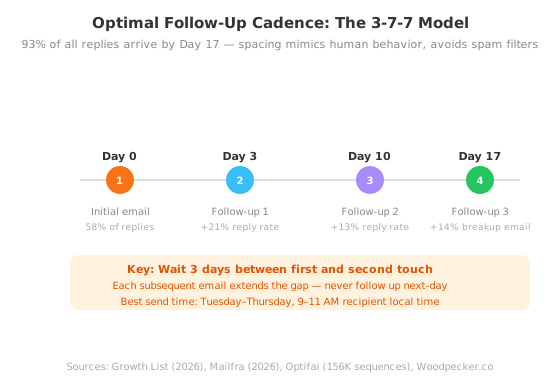
Graduated spacing works because it reads like a person. You'd never email a colleague four times in one week, and a sequence that does looks automated to the recipient.
Step 5: Personalize Beyond the First Name
A first name in the subject line still helps: readers are 26% more likely to open emails with personalized subject lines (Campaign Monitor). But that's the floor. What earns the reply is a sentence in the body that could only have been written to this person.
The personalization techniques worth the time:
- Reference a trigger event — funding announcement, leadership change, product launch. This proves you did research specific to them.
- Cite a shared connection — "Jane suggested I reach out because your team is working on X." A warm introduction carries more weight than anything you can write cold.
- Mention a specific pain point — not "many companies struggle with X" but "I noticed your team is hiring for Y role, which usually means Z challenge."
- Use more than one channel — a LinkedIn comment or a short call alongside email gives a quiet thread another way back in.
When you have the angle but not the wording, paste your unanswered email into the free follow-up email generator, state the goal in one line, and tell it which follow-up this is. It writes the next message in the thread rather than a reply, shortens as the sequence progresses, and refuses to open with "just checking in."
If the thread has run long enough that you have lost track of what was actually agreed, run it through the free email promise extractor first. It lists every commitment in the chain — yours and theirs — with the sentence each one came from and a date, so the follow-up can point at something specific instead of asking for an update in general.
Step 6: Know When to Stop — The Breakup Email
The most overlooked follow-up in any sequence is the last one. Optifai puts the "breakup email", a final message that signals you're moving on, at a 14% response rate, higher than both the 4th and 5th follow-up attempts (Optifai).
The breakup email works because it closes a window. When a prospect reads "This will be my last email," they know the chance to respond is ending, and for someone who meant to reply but got busy, that's enough of a push.
A good breakup email does three things:
- Acknowledges the silence — "I know you're busy and this may not be a priority right now."
- Restates the offer briefly — one sentence, no hard sell.
- Signals the end — "If your situation changes, feel free to reach out. Otherwise, I won't follow up again."
After the breakup email, move the prospect to something lower-touch: a monthly newsletter, the occasional relevant article, or LinkedIn engagement.
The cutoff rule: if you've sent a full four- or five-email sequence over two to three weeks with zero positive signals (no reply, no click, no LinkedIn interaction), move on. Belkins' per-step reply rate keeps sliding after step 5, and the opportunity cost of chasing a single non-responder is the prospect you could be contacting instead.
Common Mistakes That Kill Follow-Up Sequences
Even with the right structure, a few errors quietly destroy results. Here's what to watch for:
Using generic templates. If your email could have been sent to anyone, it's not personalized enough. One sentence that proves you know who you're writing to does more than three paragraphs of template copy.
Following up too fast. Same-day or next-day follow-ups read as pressure to the recipient and as automation to everyone else. Wait at least 2-3 business days between the initial email and first follow-up.
Sending too many follow-ups without variation. Pushing past five or six emails without changing your approach, subject line, or channel mostly earns unsubscribes and spam complaints, and those count against every email you send afterwards.
Focusing on copy instead of targeting. The best follow-up can't rescue an email sent to the wrong person or a dead address. Verify your list before every campaign; a common rule of thumb is to keep bounce rates under 2%.
Frequently Asked Questions
How many follow-up emails should I send?
Three to five emails in total for most B2B outreach. Belkins' analysis of 7.5 million emails sent in 2025 calls 3 to 5 steps the sweet spot, and volume falls sharply after step 5. For a client, colleague or vendor, one or two follow-ups is usually enough.
What's the best time to send a follow-up email?
Timing in days matters more than the hour. Send the first follow-up two to three business days after the original, then widen each gap after that. Send-time studies disagree on the best day and hour, and the differences they find are small, so a weekday morning in the recipient's time zone is a safe default.
What should I do if they still don't reply after 5 follow-ups?
Send a breakup email: a short note saying this is your last message. Optifai puts its response rate at 14%, higher than a fourth or fifth standard follow-up. If that gets no answer either, stop emailing and stay visible through LinkedIn or occasional useful content instead.
How do I personalize follow-ups at scale?
Research the company rather than every individual: recent news, a product launch, open roles, or a pain point common to that role. Then reference one specific detail from your previous call or email. Optifai found follow-ups that cite a specific detail get a 29% response rate, against 11% for "just checking in".
Should I use the same subject line for follow-ups?
For a short bump, reply in the same thread so the original message sits right underneath and the recipient has the context. Start a new subject line when you change the angle, as with the Day 10 email in the 3-7-7 cadence, so the email reads as something new rather than another reminder.
A Faster Way to Run Your Follow-Ups
The six-step system above works in any email client with no paid tools. The part it can't fix is remembering which threads need a follow-up at all. NeatMail reads your Gmail or Outlook threads for commitments, yours and the ones made to you, and files each under a Follow up label with its due date. When your own deadline is close it drafts the delivery email, and when someone else's promise is overdue it drafts the nudge, so the follow-up is waiting in your drafts instead of in your memory.
It costs $9 a month, with a 7-day trial and a 14-day money-back guarantee.
Conclusion
The gap between a silent inbox and a replied email is rarely better copy or a better offer. It's a follow-up system: knowing which threads went quiet, and chasing them at the right pace. The numbers point the same way:
- Follow-ups bring in 58.6% of all replies; the first email gets 41.4% (Belkins, 2025).
- A single follow-up increased replies by 65.8% in Backlinko's 2019 study.
- Three to five emails is the sweet spot for B2B outreach (Belkins).
- The breakup email gets a 14% reply rate — higher than the fourth or fifth standard follow-up (Optifai).
Here's the action plan:
- Pick how you'll track follow-ups. Use the table at the top and choose the method that fails least for your volume.
- Set up your timing. Space your emails on the 3-7-7 cadence from Step 4: Day 0, Day 3, Day 10 and Day 17. Extend only if replies are still coming in.
- Add value to every touch. Never send "just checking in." Every email provides new information, a different angle, or social proof.
- Personalize beyond the name. Research company events and reference them naturally.
- Send the breakup email. It's not giving up — it's creating a response trigger.
- Move non-responders to nurture. Keep showing up through LinkedIn and newsletters.
Most people send one email and call it outreach. The ones who get replies have a system: they notice when a thread goes quiet, space their follow-ups, and say something new each time. Pick your tracking method and set up your first sequence this week.