







An out of office message is the automatic reply your email account sends on your behalf while you're away, and a good one answers three questions in under 60 words: when you're back, whether you're reading email in the meantime, and who to contact if it can't wait. Below are 43 copy-paste out of office message examples grouped by situation (professional, simple, short, funny, vacation, holiday, one-day, business travel, delayed response, and leave), plus the Outlook and Gmail behaviour that quietly decides how many people ever see yours.
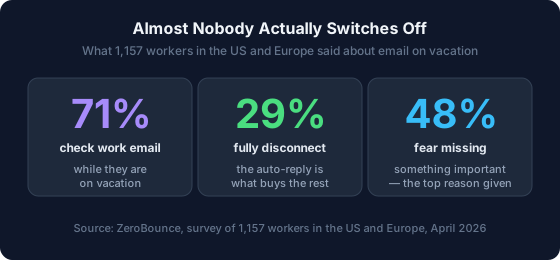
Most people write this message in the ninety seconds before they shut the laptop, which is exactly why so many auto-replies say nothing useful. It carries more weight than those ninety seconds suggest. In February 2026 the email deliverability company ZeroBounce surveyed 1,157 professionals across the US and Europe for a report it called The Out-of-Office Illusion, and found that only 29% fully disconnect on vacation (ZeroBounce, 2026). A clear auto-reply is a large part of what makes not checking survivable.
Fill in your dates below and the generator writes the message for you. Or scroll past it, find an example further down that fits, and press Use this template underneath it: that wording drops into the generator with your return date and your backup contact already in place, ready to copy.
Hello, Thank you for your email. I'm currently out of the office and will return on [the date I return]. I'll have limited access to email, and I'll reply as soon as possible after I return. Best regards, [Your name]
Add your name to finish the message.
Generated in your browser — nothing you type is uploaded or stored.
Key Takeaways
- A working out of office message needs three things and nothing else: your return date, whether you're checking email, and a named backup contact.
- In 2026, ZeroBounce found only 29% of professionals fully disconnect on vacation (ZeroBounce, 2026). The auto-reply is what buys you the other days.
- Outlook replies once per person for your whole absence. Gmail replies on the first message, then again only if that person writes more than four days later (Google Help, 2026).
- Outlook's Automatic Replies feature does not exist on a personal Gmail, Yahoo, or other IMAP account. Microsoft says so outright (Microsoft Support, 2026).
- Never say where you are. "Out of the office" is safer than "in Portugal for three weeks", because auto-replies answer strangers too.

What Should an Out of Office Message Say?
Three things, and it should stop there. Your reader wants to know when you'll be back, whether you're reading email while you're gone, and who can help if it can't wait. Everything past those three is decoration. Most of the auto-replies that annoy people fail on the second one. They say "I'm away" without saying whether "away" means slow or means silent, so the sender is left guessing whether to chase you or wait.
That guessing is the real cost. The sender either follows up three times or sits on something for a week. A single sentence removes the ambiguity: "I won't be checking email", or "I'll check once a day". It is the sentence most templates leave out.
Keep it short enough to read on a lock screen. If it runs past roughly 60 words, you've started explaining yourself, and nobody who emailed you needs your itinerary. Three things every out of office message should leave out:
- Where you physically are. "I'm in Bali until the 30th" tells every spammer and stranger who emails you that your home is empty for a fortnight.
- Why you're away, in detail. "On leave" covers surgery, a funeral, and a wedding equally well, and none of them are the sender's business.
- An apology. You're allowed time off. "Sorry for the delay" before the delay has even happened sets a tone you don't want.
One addition worth making, which almost nobody includes: tell people what to do with a message you'll miss. An auto-reply that ends "if I haven't replied by [date], please resend, it's easier for both of us than a follow-up chain" converts a lost email into a scheduled one. It costs you a line and saves the backlog that comes next.
Professional Out of Office Message Examples
Use these when the message will be read by clients, senior colleagues, or people who've never met you. They're written to sound composed rather than formal. The goal is that nobody has to think about your absence twice.
Thank you for your message. I'm out of the office until [date] with limited access to email, and I'll respond as soon as I'm back at my desk. If your request is time-sensitive, please contact [Name] at [email], who is covering for me while I'm away.
I'm currently away from the office and will return on [date]. I won't be monitoring this inbox in the meantime. For anything urgent, [Name] ([email]) can help. Otherwise I'll reply in the order messages arrived once I'm back.
Thanks for reaching out. I'm out of the office through [date] and replies will be slower than usual. [Name] at [email] is handling anything client-facing while I'm away, and I'm reachable at [phone] for genuine emergencies.
I'm away from my desk until [date]. Your email will be answered. It will just take a little longer than usual. If you need a response before [date], please copy [Name] at [email] and they'll pick it up in my absence.
I'm out of the office until [date], and no one is covering my inbox while I'm away. If your message needs attention before then, the fastest route is to resend it on [date] so it lands at the top of my inbox instead of in the backlog.
Thank you for your email. I'm out of the office until [date]. [Company] remains fully staffed while I'm away. For account questions, please contact [Name] at [email] or call [phone]. I'll personally follow up on anything outstanding when I return.
The fifth one is the honest version for anyone without cover, and it works better than pretending otherwise. Telling someone to resend on a specific date gives them an action instead of a wait, and it stops the "just bumping this" chain that would otherwise be waiting for you.
Simple and Short Out of Office Messages
Short is not rude. A one-line auto-reply reads as efficient, and on a phone screen it's the only version anyone finishes. Use these when your absence is routine and no explanation is owed.
Out of the office until [date]. I'll reply when I'm back.
I'm away until [date] with no access to email. Thanks for your patience.
Away from email until [date]. For urgent matters: [Name], [email].
On leave through [date]. I'll get back to you after that.
I'm out until [date]. Nothing gets lost. I'll work through my inbox when I return.
Away until [date]. If it's genuinely urgent, please call [phone].
The same instinct that makes these work makes for better replies once you're back at your desk. If short-form email is something you want to get faster at generally, the ARC pattern for short email replies is the same idea applied to your day-to-day inbox.
Out of Office Messages for One Day or a Few Hours
A single day off still deserves an auto-reply, because the sender's expectation for a Tuesday email is a Tuesday answer. These are deliberately casual, because a one-day message that sounds like a two-week message reads oddly.
I'm out of the office today, [date], and back tomorrow morning. I'll reply to your message then.
I'm in meetings for the rest of today and picking up email tomorrow, [date]. If something can't wait, text me at [phone].
I'm away from my desk until [time] today. Anything that arrives before then gets an answer this afternoon.
I'm out for a long weekend and back at my desk on [date]. Whatever arrives before then will get a reply that morning.
Vacation Out of Office Message Examples
Vacation messages carry one extra job: they have to make clear that you are gone rather than politely pretending. Vagueness here is what gets you emailed twice.
I'm on vacation until [date] and won't be checking email while I'm away. [Name] ([email]) is covering for me and can help with anything urgent. Otherwise, I'll reply once I'm back.
I'm on annual leave from [date] to [date]. My inbox isn't being monitored, so if this is time-sensitive please contact [Name] at [email] rather than waiting on my reply.
Thanks for your email. I'm away on vacation and back in the office on [date]. I'm staying off email deliberately so I come back useful. [Name] ([email]) has everything covered until then.
I'm out of the office on vacation until [date] with very limited signal. I'll be slow to respond and may miss messages entirely, so please resend anything I haven't replied to by [date].
On vacation through [date]. I'm checking email once a day, in the morning, and answering only what genuinely can't wait. Everything else gets a proper reply when I'm back.
That last one is the honest option for people who know they'll look. Given that 71% of professionals check work email on vacation anyway (ZeroBounce, 2026), promising silence you won't deliver just trains people to ignore your auto-reply. Saying "once a day, mornings" sets a boundary you'll actually keep.
Holiday and Christmas Out of Office Message Examples
Holiday messages usually cover a closed office rather than one absent person, so name the reopening date rather than your personal return date. That is the thing the sender is actually calculating.
Our office is closed for the holidays from [date] and reopens on [date]. I'll reply to your message once we're back. Wishing you a restful break.
Thank you for your email. I'm away for the Christmas holidays and back at my desk on [date]. For urgent matters before then, please contact [Name] at [email]. Happy holidays.
I'm out of the office for the holiday season until [date]. Our team is running a reduced schedule until then, so replies may take a few days. Thank you for your patience, and happy new year.
The office is closed for [holiday] on [date]. I'll be back at my desk on [date] and will answer your message then.
I'm off for the holidays and back on [date]. If your message is about [project], [Name] at [email] is across it. Otherwise it'll be first in line when I return.
Worth knowing when to have this one ready. Pulling monthly Google search volume for "out of office message" in August 2026, we found demand is sharply seasonal. August is the annual peak, October and December are close behind, and January is the floor at less than half of August's volume.
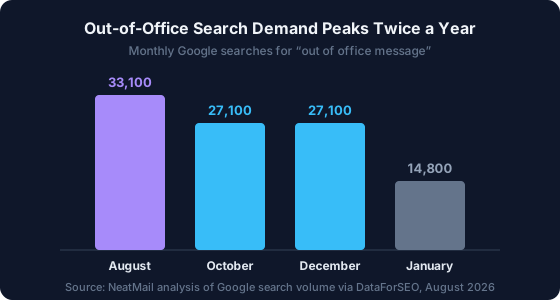
The practical read: two spikes a year, summer and the run-up to the winter holidays, and a dead January. If you manage a shared inbox or a support alias, those are the two weeks a year the holiday wording is worth writing properly rather than improvising.
Funny Out of Office Message Examples
A joke works when your regular correspondents already know your voice. It goes badly when a new client, a recruiter, or a customer complaint is on the other end. Read the second example below and picture your worst-case sender receiving it. If that makes you wince, use the professional set instead.
I'm out of the office until [date]. My inbox is unattended, unread, and quietly filling up like a bathtub. Yours is safe in the queue. If it truly can't wait, [Name] ([email]) is on duty.
Gone until [date]. I've left my laptop at home on purpose. If this is urgent, [Name] at [email] has both a laptop and my sincere apologies.
Thank you for your email, which I will read on [date] along with roughly four hundred others. If yours is one of the important ones, resend it that morning and it'll go to the top of the pile.
I'm away until [date] and have committed to not checking email. My track record on this is poor, but I remain optimistic. [Name] ([email]) is your best bet for anything real.
Out of office until [date]. In my absence, please direct all questions to [Name] at [email], all praise to me, and all urgent problems to [Name] again.
Notice that every one of them still contains a date and a contact. That's the trick with a funny out of office message: the joke rides on top of the working message, it does not replace it.
Business Travel and Conference Out of Office Messages
Travel is the awkward middle case: you're working, just badly reachable. Say that plainly instead of claiming to be out of office, or people will assume you're ignoring them.
I'm traveling for work until [date] and checking email between sessions. Replies will be short and slow. For anything that needs a real answer today, please contact [Name] at [email].
I'm at [event] through [date] with limited time at my laptop. If you're also at [event], come find me. Otherwise I'll get to your email on [date].
I'm on client site until [date] and mostly away from my inbox. [Name] ([email]) can help in the meantime, or reach me at [phone] if it's time-critical.
I'm traveling with a [X]-hour time difference until [date], so replies will land at odd hours. Nothing is being ignored, it's just arriving late.
Out of Office Messages for a Delayed Response
These are capacity messages rather than absence messages, and they are the most underused auto-reply there is. Turn one on when you're at your desk but badly behind, and you'll cut the follow-up traffic that makes being behind worse.
Thanks for your message. I'm in the office but working through a backlog after time away, so replies are taking around [X] days at the moment. If yours is time-sensitive, reply to this message with "urgent" in the subject line and I'll pull it forward.
I'm currently at capacity and responding to email once a day, at the end of the afternoon. If your message needs a same-day answer, please call [phone] instead.
I've received your email and it's in my queue. Because of [reason], my current response time is around [X] business days. There's no need to follow up. I'll get to it.
Parental, Medical, and Extended Leave Messages
Long absences need a handover, not an apology. Name the person taking over and what they cover, and keep the reason as vague as you're comfortable with, because this reply will be read by people you've never met.
I'm on parental leave until [date] and won't be reading email while I'm away. [Name] ([email]) has taken over my responsibilities and can help with anything you'd normally bring to me.
I'm on medical leave and away from work until approximately [date]. This inbox isn't being monitored. Please contact [Name] at [email], who can direct your request to the right person.
I'm out on extended leave through [date]. For anything relating to [area], contact [Name] at [email]; for everything else, [Name] at [email]. I'll reconnect with everyone when I'm back.
I'm away on sabbatical until [date] and not reachable by email. [Name] ([email]) is the right contact in the meantime. I'll be back and reading email from [date].
Which Out of Office Messages Actually Get a Human to Act
Every page you will find for this search, this one included, hands you wording and then stops. None of them tell you whether the wording works, and there is a reason. Nobody has published reply-rate data on out-of-office auto-replies specifically. We went looking for one and found nothing: plenty of documentation on how autoresponders route, no measurement of what senders do after they receive one.
Two adjacent things have been measured, though, and between them they get close.
What real auto-replies say. In ZeroBounce's February 2026 survey of 1,157 professionals, only 29% said their most recent out of office message clearly stated they would not be checking email. Another 20% used vague wording like "limited access", 14% said outright they would be checking occasionally, and 26% set no message at all (ZeroBounce, 2026). On those numbers, fewer than a third of auto-replies answer the question the sender is actually asking.
What makes any email get a response. Boomerang analysed the 40 million messages its users had asked it to chase for a reply, and published the factors that moved the rate. Length: 50 to 125 words drew responses above 50%, while a 25-word message drew about 44%. Reading level: text at a 3rd-grade level beat college-level text by 36%. Questions: an email asking one to three questions was 50% more likely to get a response than one asking none (Boomerang, 2016).
That research covers emails whose sender wanted a reply, which is not what an auto-reply is. Read it as a mechanism rather than a number. What it isolates is the single thing an auto-reply controls: whether the message asks the reader to do anything at all.
We measured 83 templates against it
On 30 August 2026 we pulled every page ranking for "out of office message examples", took all 83 complete templates from the seven that publish them, and measured each one.
| Page | Templates |
|---|---|
| SMTP2GO | 22 |
| Superhuman | 22 |
| Grammarly | 10 |
| Fyxer | 9 |
| Indeed | 8 |
| Rocketseed | 7 |
| BoldDesk | 5 |
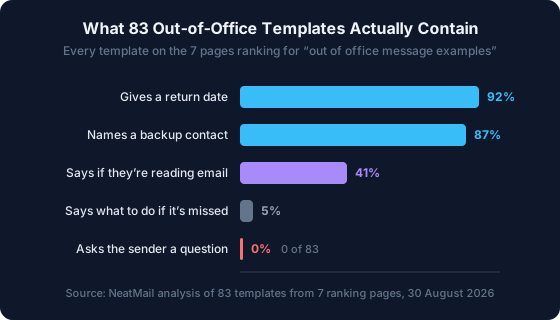
The basics are in good shape. 92% give a return date and 87% name someone to contact instead, which are two of the three things that matter. The median template reads at a US grade 4.9 reading level, close to the range Boomerang found optimal, so nobody is writing these in legalese.
Three findings are worth your attention.
They are shorter than the band that works. The median template runs 37 words, and 87% come in under 50. Not one exceeds 125. That is counting each [placeholder] as a single word, so it flatters them; even if every placeholder expanded to three words, 63% would still land under 50. Boomerang's floor sits at 50 words for a reason, and the 25-word auto-reply that feels efficient is in the band where response rates fall off.
Under half say whether you are reading email. Only 41% state it either way. That is the field ZeroBounce found people hedging in real life too, and it is the one the sender needs most: "away" that means slow and "away" that means silent call for completely different behaviour from them.
Not one of the 83 asks the sender a question. Across all seven publishers, not a single template ends with anything the reader has to answer. Four of them (5%) at least tell the sender what to do if the message gets missed. The rest hand over a name and a date and leave it there.
That last one is the gap. An auto-reply is one of the few emails you send where you already know the recipient is holding something that needs to move, and the whole genre has settled on a format that gives them nothing to act on. You do not want a reply to your auto-reply. You want the right thing to happen to the message, and the one lever Boomerang's data identifies is a direct ask.
It costs one line:
Thank you for your message. I'm out of the office until [date] and not reading email. [Name] at [email] is covering anything that can't wait. If yours can wait: is it still live on [date]? If so, resend it that morning and it goes to the top of my inbox instead of into the backlog.
That version gives the sender a decision to make instead of a wait to endure, which is the only lever you have over how big the pile is when you get back. None of the 83 templates use it, which is the whole reason this one is here.
Two limits on the numbers, so you can weigh them. Length and question counts are mechanical, but "names a backup contact" and "says whether they are reading email" were matched by pattern, so a template phrasing either unusually could be missed. And the sample is what ranks for one query on one day: it is the corpus people actually copy from, not a random sample of auto-replies in the wild.
What Outlook and Gmail Actually Do With Your Auto-Reply
The same words behave differently depending on where you paste them. Outlook sends your automatic reply once to each person for your entire absence (Microsoft Support, 2026). Gmail replies the first time someone writes, then again only if that same person emails you more than four days later (Google Help, 2026). Same message, different reach.
| What actually happens | Outlook (Exchange / Microsoft 365) | Gmail |
|---|---|---|
| How often one sender gets it | Once, for the whole absence | On the first email, then only after 4 days |
| Newsletters, ads, and junk | External replies go to everything; Microsoft recommends "Send replies only to contacts" | Never replies to spam, or to mailing lists you subscribe to |
| Internal vs. external wording | Two separate messages, one per audience | One message, with an optional "contacts only" limit |
| Exact on/off timing | Optional date range; otherwise it runs until you stop it | 12:00 AM on the start day to 11:59 PM on the end day |
| Your signature | Not appended automatically | Appears below the reply |
| Personal IMAP account | Not supported at all | N/A |
Two rows there are worth stopping on.
The IMAP catch. If you use the Outlook app with a personal Gmail, Yahoo, or other IMAP address, the Automatic Replies button isn't hidden. The feature doesn't exist for you. Microsoft's own documentation states it plainly: "Automatic replies are not supported for Gmail, Yahoo, or other POP or IMAP accounts" (Microsoft Support, 2026). The workaround is a rule plus a message template, and it only fires while Outlook is running on a machine that's switched on. This is the single most common reason people think their out of office "didn't work".
The junk row. If your Outlook account is a work or school one, replying to everyone outside your organisation means replying to newsletters, advertisements and whatever else arrives. Microsoft's own guidance is to pick "Send replies only to contacts" instead (Microsoft Support, 2026). Gmail already does this for you: it never answers spam, or a mailing list you subscribe to.
For the exact click paths in each version, meaning new Outlook, classic Outlook, Outlook on the web, the mobile app, and Gmail's Vacation responder, the out of office message generator has step-by-step instructions for all of them under the tool.
The Part Every Out of Office Template List Skips
Templates stop at the message. The part that actually hurts is the morning you get back, and no auto-reply can do a thing about that one. The message you set is a promise to hundreds of people that you'll deal with them later, and "later" all arrives at 9am on the same Monday.

This is the pattern we kept running into while building NeatMail. The auto-reply does its job perfectly and the backlog it creates is completely unmanaged. People come back and re-read the same 300 messages three times over, trying to remember which ones they'd promised something to. The ZeroBounce finding that 48% of people check email on vacation specifically because they're afraid of missing something important (ZeroBounce, 2026) is really a description of that fear. People check because they don't trust the pile they'll come back to.
Two things make the return survivable, and you can set both up before you leave:
- Filter the noise out before it lands. Newsletters, receipts, and notifications will make up most of the pile and none of them need reading in order. A handful of rules routes them out of the inbox while you're away, and our guide to email filters and folders and the Gmail filter generator cover the ones worth setting.
- Separate the promises from the noise. What you actually owe people after a week away is a short list of replies, buried in a long list of messages. That's the job NeatMail does: it reads what arrived while you were out, files every promise it finds under a single Follow up label in Gmail or Outlook, and drafts the replies, so day one back is a list rather than archaeology.
If the return backlog is your real problem rather than the message itself, the complete guide to email management and our breakdown of Inbox Zero at 100+ emails a day go deeper than an auto-reply can. And while you're setting things up before you leave, a current email signature is the other thing that quietly represents you while you're gone.
Frequently Asked Questions
What is the best out of office message?
The best one is short and specific: your return date, whether you're checking email, and a named backup contact with their address. Anything past roughly 60 words is decoration. Skip your location and your reason: auto-replies reach strangers and spammers as well as colleagues.
How do I write a professional out of office message?
Open with a thank-you, state the date you return, say plainly whether you're reading email, then name one person and their email address for urgent matters. Close warmly in one line. Avoid apologising for being away, and never include your travel plans or physical location.
Does everyone who emails me get my out of office reply?
No. Outlook sends it once per person for your whole absence (Microsoft Support, 2026). Gmail sends it on the first message, then again only if that person writes more than four days later, and never replies to spam or to mailing lists you subscribe to (Google Help, 2026).
Why is there no Automatic Replies option in my Outlook?
Because your account is a personal Gmail, Yahoo, or other POP/IMAP address. Microsoft states that "automatic replies are not supported" for those account types (Microsoft Support, 2026). Automatic Replies only appears on Exchange and Microsoft 365 accounts; otherwise you need a rule with a message template.
Do out of office messages actually get people to do what they say?
Nobody has published reply-rate data on auto-replies specifically, so the honest answer is that it has not been measured directly. Two things next to it have. Only 29% of professionals say their most recent out of office message clearly stated they would not be checking email (ZeroBounce, 2026), and of the 83 templates on the pages ranking for this search, not one asks the sender a question, even though Boomerang found emails asking one to three questions are 50% more likely to get a response than emails asking none (Boomerang, 2016). One direct ask is the change almost nobody makes.
Should I use a funny out of office message at work?
Only if you know who emails you. A joke lands with colleagues and regulars, and reads badly to a first-time client, a recruiter, or someone with a complaint, and you can't pick which of them receives it. If any of those are plausible, use a professional message instead.
How long should an out of office message be?
Under 60 words for almost every situation. It's read on a phone, usually in a notification preview, and the sender only needs three facts. Extended leave is the one exception, where a proper handover to a named colleague is worth a couple of extra sentences.
Conclusion
Forty-three examples in, the pattern should be clear: the wording barely matters, and the three facts do. Return date, whether you're reading email, who to contact instead. Every good out of office message on this page is those three things with a different amount of personality on top, and every bad one you've received was missing at least one of them.
Two things are worth carrying away beyond the copy-paste. First, your platform decides who ever sees the message: Outlook once per person, Gmail once every four days, and neither one at all if you're running a personal IMAP account through the Outlook app. Second, the auto-reply is only half the job. It buys you the week off; it does nothing about the Monday.
Pick the example that matches your situation, swap the brackets for your details, and set an end date so it switches itself off. If you'd rather have it written for you, the out of office message generator at the top of this page will do it in about fifteen seconds, and it has the Outlook and Gmail setup steps underneath.
Sources:
- Google Help, Send an automatic reply when you're out of office (Gmail Vacation responder), retrieved 2026-08-30, https://support.google.com/mail/answer/25922
- Microsoft Support, How to set up out of office automatic replies in Outlook, updated 2026-08-20, retrieved 2026-08-30, https://support.microsoft.com/en-US/Outlook/mail/how-to-set-up-out-of-office-automatic-replies-in-outlook
- ZeroBounce, The Out-of-Office Illusion: What Our Email Habits Reveal About Work Culture (survey of 1,157 professionals in the US and Europe, collected February 2026), retrieved 2026-08-30, https://www.zerobounce.net/email-habits-work-culture-study
- Boomerang (Baydin), 7 Tips for Getting More Responses to Your Emails (With Data!), 12 February 2016, retrieved 2026-08-30, https://blog.boomerangapp.com/2016/02/7-tips-for-getting-more-responses-to-your-emails-with-data/
- NeatMail, analysis of monthly Google search volume for "out of office message" via DataForSEO, August 2026
- NeatMail, content analysis of 83 out-of-office templates from the seven pages ranking for "out of office message examples", collected 2026-08-30. Method and per-page counts in the section above.