






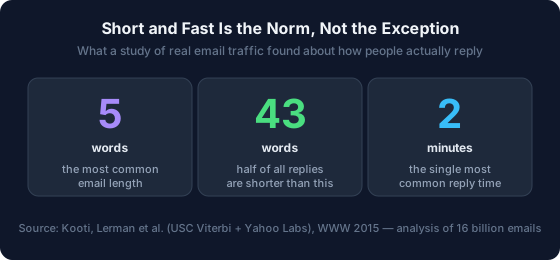
The fastest way to write a short email reply is to stop hunting for the perfect template and build the message from three parts: Acknowledge what they sent, Respond with your actual answer, and Close with a next step. That's the ARC pattern. It works because short replies are already the norm — in one of the largest studies of real email ever run, the single most common message was just five words long (Kooti, Lerman et al., 2015). Below are 15+ short reply examples for every common situation, each built on ARC so you can adapt them in seconds instead of pasting them blindly.
In 2026, roughly 392.5 billion emails are sent and received every day (Radicati Group via Statista, 2026), and the average worker receives about 121 of them (cloudHQ, 2025). Nobody has time to compose a masterpiece for each one. So why do most "email template" articles hand you 50 pre-written paragraphs to scroll through and personalize? You end up spending more time picking a template than you would have spent just writing the reply.
This guide takes the opposite approach. First a simple structure you can apply to any message, then the ready-to-use examples grouped by situation, and finally what we've learned building an AI tool that drafts these replies at scale — including when a template quietly makes you look worse.
Key Takeaways
- Short replies are the default, not a shortcut: the most common email is 5 words and more than half of all replies run under 43 words (Kooti/Lerman, USC + Yahoo Labs, 2015).
- Use the ARC pattern — Acknowledge, Respond, Close — to write any short reply in three lines without a template.
- Speed beats polish: 90% of people rate an immediate response as important, and "immediate" now means 10 minutes or less (HubSpot Research, 2018).
- Templates backfire when the opening line is generic. The fix is to make the Acknowledge line specific to the message you received.
- Emails of 50–125 words get the highest reply rates, and asking 1–3 questions lifts responses by ~50% (Boomerang, 2016).

What Makes a Short Email Reply Actually Work?
A short reply works when it feels complete despite being brief — and completeness comes from structure, not length. More than half of all email replies are already shorter than 43 words (Kooti/Lerman, 2015), so the reader isn't expecting an essay. What they need is proof you read the message, a clear answer, and a sense of what happens next.
Most weak replies fail on one of those three. "Sounds good!" answers nothing. A three-paragraph wall buries the answer. A blunt "No." skips the acknowledgment and reads as cold. The trick is to hit all three beats in as few words as possible — which is exactly what the ARC pattern forces you to do.
According to the same USC and Yahoo Labs study, the most common email length is five words and the single most common reply time is two minutes (Kooti, Lerman et al., 2015). Short and fast isn't lazy — it's how email actually moves. A reply that respects that reality gets read, understood, and acted on faster than a polished one that arrives a day late.
The ARC Framework: Acknowledge, Respond, Close
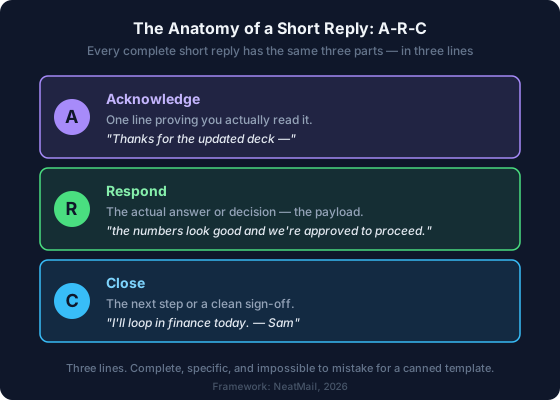
The ARC pattern turns any incoming email into a three-line reply: Acknowledge (show you read it), Respond (give your actual answer), Close (state the next step). It's a structure, not a script — which means it adapts to any situation instead of trapping you in a canned paragraph. Once you see it, you can't unsee it in every good short email you receive.
Here's why each beat matters. The Acknowledge line is the one most templates get wrong, because a generic "Thanks for reaching out" could apply to any email on earth. The Respond line carries the payload — the decision, the answer, the number. The Close removes ambiguity about who does what next, which is the single biggest cause of email ping-pong.
Watch it fix a bad reply. Someone sends you a revised proposal and asks if you're good to proceed.
Before (vague): "Thanks, looks good. Let me know."
After (ARC): "Thanks for the updated deck — (Acknowledge) the numbers look right and we're approved to move forward. (Respond) I'll loop in finance today and send the signed SOW by Thursday. (Close)"
The second version is only two sentences longer, but it closes the loop. There's nothing left to clarify, so there's no follow-up email asking "what did you mean by let me know?" That's the whole point: a good short reply ends the thread instead of extending it.
From experience: Building NeatMail's AI draft pipeline, we noticed the drafts people send without editing almost always follow this shape — a specific acknowledgment, one clear answer, one next step. The drafts that get rewritten are usually missing the Close, so the reader is left guessing what happens next.
15+ Short Email Reply Examples by Situation
Here are 15+ short reply examples across the eight situations that fill most inboxes — grouped, ARC-built, and deliberately brief. Boomerang's analysis of 40 million emails found messages of 50–125 words earn the highest reply rates (Boomerang, 2016), so each example is written to stay in that zone. Treat them as patterns to adapt: swap the bracketed details for your own and the structure holds. Replace [Name], [date], and [topic] as you go.
1. Acknowledging Receipt ("Got it")
Use when someone sends information you don't need to act on yet. Confirm you received it so they're not left wondering.
"Got it, thanks [Name] — I've saved the file and will review it before our call Thursday."
"Received, thank you. No changes needed on my end; you're clear to proceed."
2. Confirming or Saying Yes
Use to lock in a decision fast. Lead with the yes so it's unmissable on a phone screen.
"Yes, [date] at 2pm works for me — I'll send a calendar invite with the dial-in."
"Happy to. Count me in for the workshop; let me know if you need anything from me beforehand."
3. Declining Politely (Saying No)
Use when the answer is no. Here the Acknowledge line matters most — it softens the no without burying it.
"Thanks for thinking of me for this. I can't take it on right now with my current deadlines, but I'd be glad to help point you to someone who can."
"Appreciate the invite. I'm going to pass this round to stay focused on [priority], but please keep me on the list for next time."
4. Buying Time ("I'll Get Back to You")
Use when you can't answer fully yet. A holding reply in two minutes beats a complete reply in two days — and it stops the other person from chasing you.
"Good question — I don't have the answer offhand. Give me until Wednesday to check with the team and I'll come back with specifics."
"On it. I need to confirm a couple of numbers before I commit; you'll have a firm date from me by end of day tomorrow."
5. Scheduling a Meeting
Use to book time without the back-and-forth. Offer concrete options instead of "when works for you?"
"Let's do it. I'm open Tuesday 10–11am or Thursday after 3pm — pick whichever suits and I'll send the invite."
"Sure. Here's my booking link so you can grab any open slot: [link]. If nothing fits, reply with two times and I'll make one work."
6. Answering a Quick Question
Use when someone asks something specific. Answer first, context second — never the reverse.
"Yes, the report covers Q2 as well. The regional breakdown starts on page 12 if that's what you're after."
"It's $49/month on the annual plan. That includes everything in Pro plus the usage cap increase you asked about."
7. Following Up or Nudging
Use to revive a stalled thread without nagging. Keep it light and give them an easy out. For longer sequences, see our guide to handling email follow-ups.
"Hi [Name] — just floating this back to the top of your inbox. No rush if you're heads-down; a one-line reply is totally fine."
"Circling back on the proposal from last week. Are we still good for a decision by Friday, or would more time help?"
8. Closing the Thread (Thanks and Sign-Off)
Use to end an exchange cleanly so nobody wonders whether a reply is still owed.
"Perfect, that's everything I needed — thanks for the quick turnaround. Talk soon."
"Appreciate you sorting this out so fast. Closing the loop here; I'll reach out if anything else comes up."

When Is a One-Line Reply the Professional Move?
A single-line reply is the professional move whenever you're confirming, thanking, or acknowledging — and it becomes a liability the moment you're declining or delivering news. The data backs the instinct: with the most common email running just five words (Kooti/Lerman, 2015), nobody reads "Confirmed, thanks" as rude. They read it as efficient.
The line to watch is emotional weight. "Yes, ship it" is a perfect one-liner. "No, we're not moving forward" as a one-liner reads as cold, because a rejection with no acknowledgment feels dismissive. The rule I use: if the message carries good or neutral news, one line is plenty; if it carries a no, a delay, or a correction, add the Acknowledge beat back in so it lands as considered rather than curt.
There's a practical reason short wins, too. Mobile is now the primary reading environment for most people (Litmus, 2026), and the same email study found people reply almost twice as fast from a phone as from a laptop (Kooti/Lerman, 2015). A reply that fits on one phone screen gets answered on the spot. A dense one gets marked "reply later" — and later often means never.
How Fast Should You Reply to an Email?
Fast enough that the reply still matters, which for most professional email means within a few hours, not a few days. In 2018, HubSpot found 90% of people rated an immediate response as important or very important, and defined "immediate" as 10 minutes or less (HubSpot Research, 2018). You don't have to hit 10 minutes — but the expectation bar has moved, and speed is now part of the message.
Real behavior already runs fast. Half of all email responders reply in just under an hour, and 90% reply within a day or two (Kooti/Lerman, 2015). The takeaway isn't "reply instantly to everything" — it's that a good-enough reply sent now beats a perfect reply sent tomorrow. This is why the "buy time" one-liner in section 4 is so powerful: it lets you be fast and thorough without choosing between them.
In sales, the cost of waiting is brutal and measurable. A landmark Harvard Business Review analysis found firms that contacted a lead within an hour were about seven times more likely to have a meaningful conversation with a decision-maker than those who waited even 60 minutes longer (Harvard Business Review, 2011). The same principle scales down to everyday email: the value of a reply decays with every hour it sits in drafts.
The Template Tax: When Copy-Paste Replies Backfire
Templates save time until they cost you credibility — and the failure point is almost always the opening line. A canned "Thank you for reaching out" tells the reader one thing: this could have been sent to anyone. The paradox of templates is that the part meant to sound warm is the part that gives away that no human paid attention.
We see this pattern constantly in NeatMail's draft data. The AI generates a suggested reply for an incoming email, and the user either sends it as-is or edits it first. The drafts that go out untouched are the ones where the opening references something specific from the message — a name, a deadline, a detail. The drafts that get rewritten almost always open with a generic pleasantry. Specificity in the first line is the difference between a reply that ships and one that gets redone.
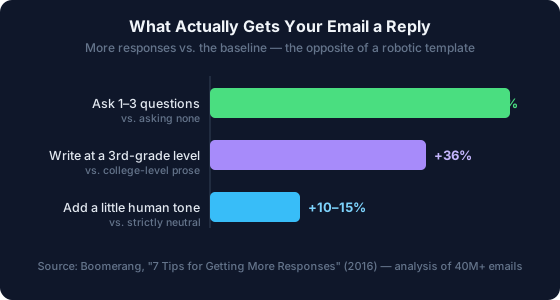
The response data agrees. Boomerang's analysis of 40 million emails found that writing at a simpler, third-grade reading level earns 36% more responses than college-level prose, and asking one to three questions lifts responses by around 50% (Boomerang, 2016). A stiff, formal template does the opposite of both — it's complex, neutral, and question-free.
What we found: The best templates aren't paragraphs — they're the ARC skeleton with a blank Acknowledge line. Keep the Respond and Close beats reusable, and rewrite the first line fresh every time. That single habit removes almost everything that makes a templated reply feel templated.
So use templates. Just don't let them write your first sentence. Boomerang also found that slightly positive or negative tone earns 10–15% more replies than a strictly neutral one (Boomerang, 2016) — one more thing a copy-pasted paragraph tends to strip out.
How AI Changes Short Email Replies in 2026
AI has quietly turned the whole template model inside out: instead of you finding a template and filling it in, the tool reads the incoming email and drafts a specific reply you approve or tweak. Done well, that solves the template tax at its root, because the draft is generated from this message, not pulled from a generic library. The Acknowledge line comes pre-personalized. You can test that on a real message with the free AI email response generator — paste the email you received, state your goal in a line, and check whether the draft hits all three ARC beats before you send it.
That only helps if the AI actually understands context. A tool that drafts "Thanks for your email" has just automated the exact problem templates already had. The useful ones pull in real signals — the thread history, your calendar, who the sender is — so the reply reflects what's actually going on. NeatMail's drafts, for instance, check your calendar before proposing a meeting time and read the prior conversation before answering, which is what keeps the Respond line accurate rather than plausible-sounding.
Even so, the human still owns the send button — and ARC is how you sanity-check any draft in two seconds. Does it acknowledge the real message? Does it answer the actual question? Does it say what happens next? If a generated reply misses a beat, you know exactly which line to fix. The framework doesn't get replaced by AI; it becomes the checklist you run before anything leaves your outbox. If you'd rather see how automated drafting holds up in practice, we compared the approaches in our Superhuman vs. NeatMail breakdown.
Frequently Asked Questions
What is a good short email reply?
A good short reply proves you read the message, gives a clear answer, and states the next step — the ARC pattern. Length isn't the goal; completeness is. More than half of all email replies already run under 43 words (Kooti/Lerman, 2015), so brevity reads as normal, not abrupt.
How short is too short for a professional email?
A one-line reply is fine when you're confirming, thanking, or acknowledging — the most common email is just five words (Kooti/Lerman, 2015). It's too short when you're declining or delivering bad news, where skipping the acknowledgment makes a curt line feel dismissive. Add one warm sentence in those cases.
How quickly should I reply to a professional email?
Aim for within a few hours during the workday. In 2018, 90% of people rated an immediate response as important, defining "immediate" as 10 minutes or less (HubSpot Research, 2018). Half of all responders already reply within an hour (Kooti/Lerman, 2015). A quick holding reply counts.
Is it rude to send a very short email reply?
No — a short reply that fully answers the question reads as efficient, not rude. Tone matters more than length: Boomerang found emails with slightly positive or negative sentiment get 10–15% more responses than strictly neutral ones (Boomerang, 2016). A brief, warm line beats a long, flat one.
Should I use email templates for replies?
Use them for the reusable middle — your answer and sign-off — but rewrite the opening line every time. Generic first lines are what make a reply feel canned. Boomerang found simpler, more human writing earns 36% more responses (Boomerang, 2016), which a rigid template tends to erase.
Conclusion
Short email replies aren't a compromise you make when you're busy — they're how email already works. The most common message is five words, most replies are under 43, and the typical reply lands in about two minutes (Kooti/Lerman, 2015). The people who seem effortless over email aren't writing better paragraphs. They're running a structure.
That structure is ARC: Acknowledge, Respond, Close. It writes any reply in three lines, it survives on a phone screen, and it gives you a two-second checklist for anything an AI drafts on your behalf. Templates can fill the middle, but keep the first line yours — that's the one thing that tells the reader a person is on the other end.
Start with the eight situations above, adapt one to a real email in your inbox right now, and notice how much faster the thread closes.
Sources:
- Kooti, Lerman et al. (USC Viterbi + Yahoo Labs), Evolution of Conversations in the Age of Email Overload, WWW 2015, retrieved 2026-07-21, https://www.sciencedaily.com/releases/2015/10/151005151212.htm (paper: https://arxiv.org/abs/1504.00704)
- Boomerang, 7 Tips for Getting More Responses to Your Emails (With Data!) — analysis of 40M+ emails, 2016, retrieved 2026-07-21, https://blog.boomerangapp.com/2016/02/7-tips-for-getting-more-responses-to-your-emails-with-data/
- HubSpot Research, Live Chat Exposes a Fatal Flaw in Your Go-to-Market, 2018, retrieved 2026-07-21, https://blog.hubspot.com/sales/live-chat-go-to-market-flaw
- Harvard Business Review, The Short Life of Online Sales Leads, 2011, retrieved 2026-07-21, https://hbr.org/2011/03/the-short-life-of-online-sales-leads
- cloudHQ, Workplace Email Statistics 2025, retrieved 2026-07-21, https://blog.cloudhq.net/workplace-email-statistics/
- Litmus, Email Client Market Share, May 2026, retrieved 2026-07-21, https://www.litmus.com/email-client-market-share
- The Radicati Group via Statista, Email Statistics Report 2022–2026, retrieved 2026-07-21, https://www.statista.com