







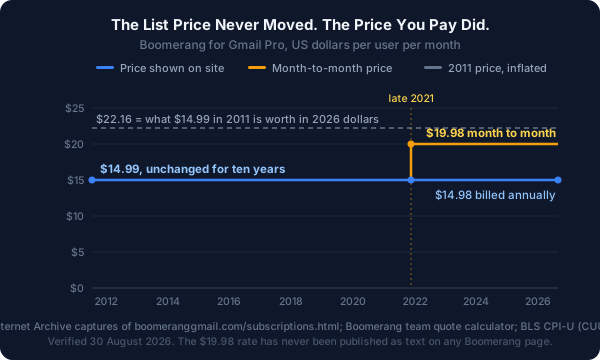
In October 2021, Boomerang for Gmail cost $14.99 a month. In December 2021, it cost $14.98 a month. The headline price had gone down by a penny.
It was a 33% price increase.
The word that changed alongside the number was "annually." Before that autumn, Boomerang's pricing page read $14.99/Month. After it, the same page read $14.98/Month billed annually, and a customer who wanted to keep paying month to month started paying $19.98. That monthly figure has never appeared as text on Boomerang's website. It lives in a JavaScript function behind the team quote calculator, where we found it, and it is reproduced in full below.
This page is the record of that. Every Boomerang tier for Gmail and Outlook, the monthly and per-seat rates the site doesn't print, fifteen years of archived list prices, and what a team of 25 actually pays.
Quick answer: how much does Boomerang cost in 2026?
- Basic: free. 10 message credits a month, shared across Boomerang, Send Later, Response Tracking and Read Receipts combined.
- Personal: $4.98/mo, billed annually. Unlimited credits and mobile apps, but only for
@gmail.comaddresses. Google Workspace users can't buy it.- Pro: $14.98/mo, billed annually. The entry point for a work address. Adds Respondable ML, Inbox Pause advanced, recurring messages.
- Premium: $49.98/mo, billed annually. Track-by-default, Salesforce/CRM, Boomerang Toolbox, priority support.
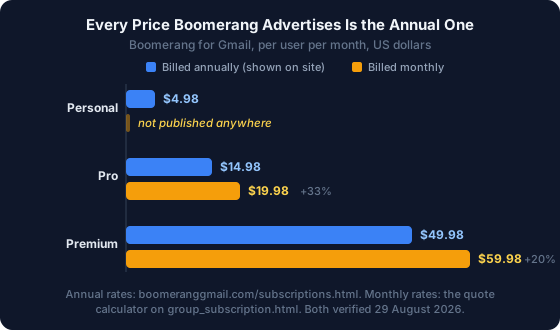
- Month to month: Pro is $19.98 and Premium is $59.98. Personal has no published monthly price at all.
- Annual plans are non-refundable. No credits for partial months or years (Refund Policy).
Disclosure: NeatMail is our product and appears in the comparison below. Boomerang figures come from its public pricing pages, help centre, refund policy and archived snapshots, verified 30 August 2026, not from hands-on testing of every tier. Where Boomerang wins, we say so.
How much does Boomerang cost?
Boomerang for Gmail costs $0 to $49.98 per user per month. Basic is free with 10 message credits monthly. Personal is $4.98, Pro is $14.98 and Premium is $49.98, all billed annually (Boomerang for Gmail subscriptions, 2026). Billed monthly, Pro rises to $19.98 and Premium to $59.98. Boomerang for Outlook is a separate product at $4.99 and $14.99, with no Premium tier.
The four prices Boomerang doesn't publish
Boomerang's pricing page prints four numbers and calls them monthly prices. All four are annual-billing rates. The rates a month-to-month customer pays, and the rates a team of two or more pays, appear nowhere in the text of any Boomerang page.
| What you're buying | Published price | Actual price | Where the actual price lives |
|---|---|---|---|
| Pro, 1 seat, monthly billing | $14.98/mo | $19.98/mo | getProMonthlyCost() |
| Premium, 1 seat, monthly billing | $49.98/mo | $59.98/mo | getPremiumMonthlyCost() |
| Pro, 2+ seats, monthly billing | not shown | $17.98/user/mo | getProMonthlyCost() |
| Premium, 2+ seats, monthly billing | not shown | $53.98/user/mo | getPremiumMonthlyCost() |
| Personal, monthly billing | not shown | not published anywhere | n/a |
Here is the source. It sits in an inline <script> block on Boomerang's team quote page, retrieved 30 August 2026, and it drives the monthly/yearly toggle on that page's slider:
function getProMonthlyCost(count, isMonthly) {
  if(count < 2) {
    if (isMonthly) {
      return 19.98 * count;
    } else {
      return 14.98 * count;
    }
  } else {
    if (isMonthly) {
      return 17.98 * count;
    } else {
      return 13.48 * count;
    }
  }
}
function getPremiumMonthlyCost(count, isMonthly){
  if(count < 2) {
    if (isMonthly) {
      return 59.98 * count;
    } else {
      return 49.98 * count;
    }
  } else {
    if (isMonthly) {
      return 53.98 * count;
    } else {
      return 44.98 * count;
    }
  }
}
Two things fall out of those eight numbers. The group discount is 10% and applies identically to both billing modes, so team buyers get $13.48 annual or $17.98 monthly per seat. And the calculator only goes to 100 seats; past that the slider pegs and the page routes you to sales.
To see the monthly rates in a browser rather than in source, open the team page, set the seat slider to 1, and flip the toggle from Yearly to Monthly. The number that appears is $19.98. Nothing on the subscriptions page tells you it exists.
Boomerang's own documentation confirms the option is real. Its help centre states that "all subscriptions are available with monthly pricing, or annual billing for an extra discount" (Plans and pricing, last updated 21 November 2023). All subscriptions includes Personal. The team calculator covers only Pro and Premium, because organisation subscriptions are sold on those two tiers alone, so Personal's monthly price is confirmed to exist by the vendor and printed nowhere.
Boomerang's price history, 2011 to 2026
We pulled every available Internet Archive capture of Boomerang's Gmail subscriptions page and read the price out of each one. The list price has not risen in fifteen years.
| Snapshot | Personal | Pro | Premium | Billing basis printed |
|---|---|---|---|---|
| 18 Jul 2011 | $4.99 | $14.99 | not offered | /Month |
| 01 May 2012 | $4.99 | $14.99 | not offered | /Month |
| 30 Apr 2013 | $4.99 | $14.99 | not offered | /Month |
| 02 Jul 2014 | $4.99 | $14.99 | $49.99 | /Month |
| 02 May 2015 | $4.99 | $14.99 | $49.99 | /Month |
| 01 May 2016 | $4.99 | $14.99 | $49.99 | /Month |
| 01 Jun 2017 | $4.99 | $14.99 | $49.99 | /Month |
| 04 Jun 2018 | $4.99 | $14.99 | $49.99 | /Month |
| 07 Jun 2019 | $4.99 | $14.99 | $49.99 | /Month |
| 17 Jun 2020 | $4.99 | $14.99 | $49.99 | /Month |
| 17 Oct 2021 | $4.99 | $14.99 | $49.99 | /Month |
| 06 Dec 2021 | $4.98 | $14.98 | $49.98 | /Month billed annually |
| 12 Sep 2022 | $4.98 | $14.98 | $49.98 | /Month billed annually |
| 10 Jun 2023 | $4.98 | $14.98 | $49.98 | /Month billed annually |
| 14 Jun 2024 | $4.98 | $14.98 | $49.98 | /Month billed annually |
| 22 Jul 2025 | $4.98 | $14.98 | $49.98 | /Month billed annually |
| 30 Aug 2026 (live) | $4.98 | $14.98 | $49.98 | /Month billed annually |
Premium first appears between the April 2013 and July 2014 captures. Everything else on that table is flat for a decade, then moves once, in a window we can bracket to between 17 October and 6 December 2021.
What actually happened in late 2021
Read the two captures side by side and the change is one word. $14.99/Month became $14.98/Month billed annually. A shopper comparing the two pages sees a penny off. A customer who wanted to pay monthly saw $19.98, which is 33.3% more than they had been paying. Premium went the same way: $49.99 to an effective $59.98, up 20.0%.
That is a price increase implemented entirely through the billing term, with the sticker price moving one cent in the opposite direction. We're describing the mechanics, not accusing anyone of anything: annual-first pricing is ordinary SaaS practice and Boomerang labels its annual discount honestly on the team page, where the badge reads "Save 25%!" for Pro and switches to "Save 17%!" for Premium. Both figures are correct. The gap is that the discount is presented only as a saving and never as the surcharge it also is, and the surcharged number is not written down.
One more detail suggests the change was deliberate rather than a billing-system artifact. Boomerang for Outlook, a separate product on a separate domain, has printed "when billed annually" since at least January 2019, almost three years before the Gmail product adopted the same framing. The smaller product ran the pattern first.
The price in real money
Nominally flat for fifteen years is a real thing to say about a software price. In 2026 dollars it's a large cut.
US consumer prices rose 47.8% between July 2011 and July 2026 (BLS series CUUR0000SA0, CPI-U for all urban consumers, US city average, not seasonally adjusted). The $14.99 Boomerang charged in 2011 is $22.16 in today's money. Against that:
- Today's $14.98 annual-billing price is 32.4% below the 2011 price in real terms.
- Today's $19.98 month-to-month price is 9.8% below it.
- But measured from the October 2021 capture, where $14.99 is $18.10 in today's money, the $19.98 month-to-month price is 10.4% above what the same customer was paying.
So Boomerang is a cheaper product than it was in 2011 by any measure, and a more expensive one than it was in 2021 if you refuse to prepay a year. Both statements are true and neither appears on the pricing page.
Is Boomerang free?
Yes. Boomerang Basic is free forever and includes most features, capped at 10 message credits per month (Boomerang Help, Plans and pricing, 2026). Credits are consumed by any Boomerang feature attached to a message, so snoozing, Send Later, response tracking and read receipts all draw from the same 10. New accounts also get a 30-day trial of Pro on Gmail, or 14 days on Outlook, with no card required.
Does Boomerang work with Outlook and Google Workspace?
Both, but not on every tier, and the Outlook product is the worse deal on all four axes we can measure.
| Boomerang for Gmail | Boomerang for Outlook | |
|---|---|---|
| Personal | $4.98/mo | $4.99/mo |
| Pro | $14.98/mo | $14.99/mo |
| Premium | $49.98/mo | not offered |
| Free trial | 30 days | 14 days |
| Cheap tier restricted to | @gmail.com only | Outlook.com only |
Outlook users pay a cent more per tier, get half the trial, and cannot buy Premium at any price, so track-by-default, the Toolbox and Salesforce/CRM integration are unavailable to them. Microsoft 365 accounts are excluded from Personal the same way Google Workspace accounts are, so a work address starts at $14.99 (Boomerang for Outlook subscriptions, 2026). Outlook does get a Teams tier with centralised billing and user administration, which is the one thing it has that the Gmail comparison table doesn't advertise as prominently.
Is Boomerang worth it?
It depends on what you already get free. Gmail has shipped native Schedule send and Snooze for years (Gmail Help, 2026), so Boomerang's two most famous features are no longer things you need to buy. What's still worth $14.98 a month is response tracking, read receipts, Inbox Pause and Respondable. If you only wanted to send an email on Tuesday morning, Gmail already does that.
The extension itself is mature and maintained: 800,000 users, a 4.2 rating across 2,100 reviews, version 1.9.4 shipped 9 July 2026 (Chrome Web Store, 2026). It's also one of the cheapest entries in a category where most tools now start at $30. We priced ten of them in our roundup of the best AI tools for email follow-ups, and Boomerang sits at the bottom of that range by a wide margin.
Boomerang plans at a glance
| Basic | Personal | Pro | Premium | |
|---|---|---|---|---|
| Price (annual billing) | Free | $4.98/mo | $14.98/mo | $49.98/mo |
| Price (monthly billing) | Free | not published | $19.98/mo | $59.98/mo |
| Price (2+ seats, annual) | Free | n/a | $13.48/mo | $44.98/mo |
| Message credits | 10/month | Unlimited | Unlimited | Unlimited |
| Eligible accounts | Gmail + Workspace | Gmail addresses only | Gmail + Workspace | Gmail + Workspace |
| Send Later, Boomerang reminders | Yes | Yes | Yes | Yes |
| Response tracking, read receipts, click tracking | Yes | Yes | Yes | Yes |
| Respondable, Inbox Pause, Insights (basic) | Yes | Yes | Yes | Yes |
| Meeting Scheduling, Meeting Poll | Yes | Yes | Unlimited | Unlimited |
| iPhone and Android apps | No | Yes | Yes | Yes |
| Respondable advanced ML | No | No | Yes | Yes |
| Inbox Pause advanced, recurring messages, Insights advanced | No | No | Yes | Yes |
| Track by default, Toolbox, Salesforce/CRM, GQueues | No | No | No | Yes |
The eligible-accounts row is the decision point, not the feature rows. It's what decides whether your price is $4.98 or $14.98, and it turns on the domain of your email address rather than on anything you chose.
Boomerang Basic, free
Ten message credits a month, and they aren't ten scheduled sends. They're ten uses of any credit-consuming feature. Send Later, snooze, response tracking, read receipts, click tracking, Inbox Pause, Meeting Poll and basic Respondable all work on the free tier, and all of them spend from the same allowance. Mobile apps are the one real exclusion; the iPhone and Android apps start at Personal. Gmail and Google Workspace addresses are both allowed, since the domain restriction applies only to the $4.98 tier.
Fits someone who schedules a handful of messages a month and wants read receipts occasionally. Ten credits go faster than they sound if you leave tracking switched on.
Boomerang Personal, $4.98/month
Unlimited message credits, the iPhone and Android apps, and private notes on threads. The cap disappears entirely.
The catch is in the supported-accounts row: if your email ends in anything other than @gmail.com, you cannot buy this plan. That restriction has been in place since at least the May 2012 capture of the pricing page, so it's a fourteen-year-old policy rather than a recent change.
Fits a freelancer or job seeker running everything from a personal Gmail account. It's the cheapest serious scheduling tool in the category, and it's the tier most people quoting "Boomerang costs $4.98" are unable to purchase.
Boomerang Pro, $14.98/month
Respondable with advanced machine learning, which scores in real time whether your draft will get a reply. Inbox Pause advanced features, recurring messages, advanced Insights, and unlimited meetings on Bookable Schedule rather than the capped version below it.
$19.98 if you pay monthly. The pricing page shows only the $14.98 annual figure.
Fits anyone on Google Workspace, by default rather than by choice. This is the floor for a business address, at three times the advertised entry price.
Boomerang Premium, $49.98/month
Track by default, so every outgoing message is tracked without opting in each time. Salesforce and CRM integration, the Boomerang Toolbox, GQueues, and premium support.
$59.98 if you pay monthly, and Gmail only, since Outlook has no Premium tier at all.
Fits a solo salesperson who wants tracking-by-default and CRM sync without buying a full sales engagement platform. At $599.76 a year it's competing with tools that do considerably more.
What Boomerang actually costs a team
Group subscriptions take 10% off from two seats up, on either billing mode (Boomerang for Teams, 2026). Pro drops from $14.98 to $13.48 per user per month on annual billing, or $19.98 to $17.98 monthly. Premium drops from $49.98 to $44.98 annually, or $59.98 to $53.98 monthly. The discount is real and it's the smallest lever on the table; seat count and billing term are the big ones.
| Team size | Pro, annual | Pro, monthly | Premium, annual | NeatMail Pro, annual |
|---|---|---|---|---|
| 1 user | $14.98/mo | $19.98/mo | $49.98/mo | $7.50/mo |
| 3 users | $40.44/mo | $53.94/mo | $134.94/mo | $22.50/mo |
| 5 users | $67.40/mo | $89.90/mo | $224.90/mo | $37.50/mo |
| 10 users | $134.80/mo | $179.80/mo | $449.80/mo | $75.00/mo |
| 25 users | $337.00/mo | $449.50/mo | $1,124.50/mo | $187.50/mo |
A 25-person team on Boomerang Pro pays $4,044 a year on annual billing, or $5,394 month to month. On Premium it's $13,494 and $16,194. The gap between the two Pro columns, $1,350 a year, is the cost of not committing twelve months up front, and it's the number the pricing page doesn't let you calculate.
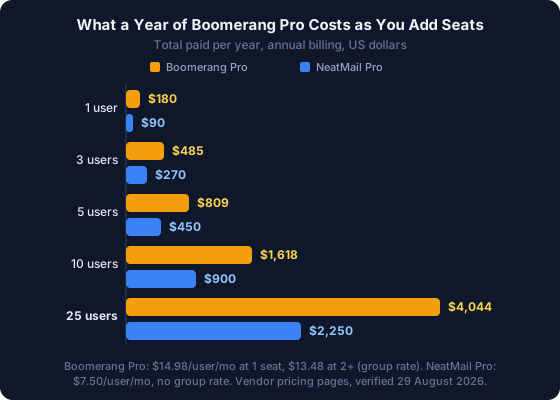
The thing worth sitting with: at 25 seats you're paying $4,044 a year largely for scheduled sending and response tracking, and Gmail gives every one of those 25 people scheduled sending for nothing. The paid value has narrowed to tracking, Inbox Pause and Respondable. That's a good product. It's a smaller one than it was in 2015, and the fifteen-year price history above shows the list price never moved to reflect either the narrowing or the inflation.
If your actual problem is "I keep losing track of what I owe people," a free follow-up email generator will show you what that job looks like before you commit a card to anything.
Six things the pricing page doesn't tell you
-
The advertised price is annual-only, and monthly costs up to 33% more. The subscriptions page lists $4.98, $14.98 and $49.98 with "billed annually" underneath and gives no monthly figure anywhere. The monthly rates are recoverable only from the pricing function inside the team quote calculator: $19.98 for Pro and $59.98 for Premium, 33.4% and 20.0% above the headline numbers. There is no published monthly price for Personal at all.
-
Annual plans are non-refundable. Boomerang's refund policy states that paid plans are prepaid and non-refundable, and that Baydin "does not provide refunds or credits for any partial months or years" (Refund Policy). Cancelling takes effect at the end of the billing cycle. The 25% annual discount therefore costs an irreversible twelve-month commitment.
-
The $4.98 tier is unavailable on a work address. Personal supports
@gmail.comaddresses only, so Google Workspace users go to Pro at $14.98, a 3x jump. Outlook mirrors this: Personal is limited to Outlook.com, so Microsoft 365 users start at $14.99. Neither restriction appears in the headline price, only in a table row. -
Free-tier credits are consumed by tracking, not just sending. Boomerang's help centre states that credits count "all messages you scheduled with Boomerang or any combination of Boomerang features (including Boomerang, Send Later, Response Tracking, and Read Receipts)." Leave read receipts on and you can exhaust the free tier without scheduling a single message.
-
Outlook gets a shorter trial and a smaller product, for a cent more. Gmail users get 30 days of Pro; Outlook users get 14. Outlook has no Premium tier, and its Personal and Pro tiers cost $4.99 and $14.99 against the Gmail product's $4.98 and $14.98.
-
The privacy policy predates the AI era. Baydin's policy was last modified 5 March 2019. It confirms Boomerang collects "the contents and header information from the Communications you send and receive through the service," stores scheduled messages on its servers until delivery, states that the company does not honour Do Not Track signals, and reserves the right to use "aggregated, anonymized records" to "develop and train algorithms" (Baydin Privacy Policy, 2019). Boomerang is SOC 2 Type 2 certified and a Google Premier Partner, so this is a documentation-age problem rather than a security one. A seven-year-old policy is still thin ground for evaluating a tool that reads your mail.
Boomerang vs the alternatives
Every price below is the cheapest paid tier at annual billing, checked against each vendor's own page on 30 August 2026.
| Tool | From (annual) | Monthly rate | Free tier | Providers |
|---|---|---|---|---|
| Gmail native | Free | Free | n/a | Gmail, Workspace |
| Boomerang | $4.98/mo | $19.98 (Pro) | 10 credits/mo | Gmail, Outlook (separate products) |
| Right Inbox | $7.95/mo | $9.95 | 5 emails/mo | Gmail only |
| Mailbutler | €8/user/mo | €9 | Yes, with a signature added to sent mail | Gmail, Outlook, Apple Mail |
| NeatMail | $7.50/mo | $9 | No, 7-day trial | Gmail, Outlook (one product) |
Boomerang is the only tool here with meeting scheduling built into the compose window, and it has the most usable free tier of the three paid extensions: 10 credits a month against Right Inbox's 5 emails and Mailbutler's watermark on everything you send. Right Inbox is the closest like-for-like on scheduling and reminders, with a higher entry price and a far smaller monthly surcharge. Mailbutler reaches Apple Mail, which nothing else here does, and it is the one tool here priced in euros rather than dollars. NeatMail is the cheapest at scale and the only one that's source-available.
Should you pay for Boomerang in 2026?
Start with what it's best at. Boomerang's meeting scheduling is unusually good, because Bookable Schedule, Meeting Poll and Suggest Times all live inside the compose window instead of behind a booking link, and Respondable's live scoring while you type still has no equivalent. With 800,000 installs, a SOC 2 Type 2 audit and an extension update as recent as July 2026, this is a product that works and is still being maintained.
The limit is what's happened around it. Scheduled sending and snoozing, the two features Boomerang invented the category with, are now free in Gmail. That leaves response tracking, read receipts, Inbox Pause, recurring messages and Respondable carrying a $14.98 monthly price for a Workspace user, $179.76 a year, non-refundable if you take the discount.
There's also an adjacent job Boomerang doesn't do. Its reminders are ones you set: you tick "remind me if no reply" when you send, and it watches that thread. Nothing watches the message you sent last Tuesday without ticking the box, or the promise you made in the fourth paragraph of a thread you didn't start. Boomerang tracks the follow-ups you remembered to ask it to track, which is the easier half of handling email follow-ups. The harder half is left to you.
Our design note: NeatMail shipped that second job as a single Gmail or Outlook label called Follow up. An earlier build split it into "waiting on you" and "waiting on them," and it tested badly. People had to remember which list to open, so they opened neither. One label inside the client you already check gets read. A second dashboard doesn't.
If your problem is scheduling and tracking messages you're consciously sending, Boomerang is a reasonable buy. If your problem is the commitments you've already forgotten, no reminder tool helps, because setting the reminder was the step you missed. Paste a thread into our email promise extractor and you'll see how many were in there. NeatMail is $9/month with a 7-day trial and a 14-day money-back guarantee, and it works on Gmail and Outlook from one subscription.
Best for / Not for
Best for
- Boomerang Basic: occasional schedulers who send under 10 tracked messages a month.
- Boomerang Personal: freelancers and job seekers on a personal
@gmail.comaddress. - Boomerang Pro: Google Workspace users who want scheduling, tracking and in-inbox meeting booking in one extension.
- Boomerang Premium: solo sellers who need track-by-default and Salesforce sync without a full sales platform.
- NeatMail: people who want commitments surfaced automatically across Gmail and Outlook, at the lowest cost per seat.
Not for
- Boomerang: Google Workspace or Microsoft 365 users hoping to pay $4.98, because that tier is closed to you.
- Boomerang: anyone who wants to pay monthly without a 20% to 33% surcharge, or who might want a refund.
- Boomerang: Outlook users who need Premium features, which don't exist on that platform.
- NeatMail: teams needing centralised billing and seat administration. We have neither, and Boomerang does.
- NeatMail: anyone who needs meeting scheduling, read receipts or click tracking. We don't build them.
Frequently asked questions
How much does Boomerang cost per month?
Boomerang for Gmail costs $4.98 (Personal), $14.98 (Pro) or $49.98 (Premium) per month on annual billing, plus a free Basic tier. On monthly billing, Pro is $19.98 and Premium is $59.98. Teams of two or more pay $13.48 per seat for Pro on annual billing, or $17.98 monthly. Boomerang for Outlook is a separate subscription at $4.99 and $14.99, with no Premium tier available.
Has Boomerang ever raised its price?
Not in nominal list terms. Personal and Pro have been $4.99 and $14.99 in every Internet Archive capture from July 2011 to October 2021, and $4.98 and $14.98 since December 2021. The 2021 change also introduced "billed annually" to the page, so the effective month-to-month price rose from $14.99 to $19.98, a 33.3% increase, while the printed number fell by one cent. Adjusted for US inflation, the current annual-billing price is about 32% below the 2011 price in real terms.
Why can't I buy Boomerang Personal?
Boomerang Personal is restricted to Gmail addresses ending in @gmail.com. If you use Google Workspace on a custom domain, the plan isn't available to you and the cheapest paid option is Pro at $14.98 per month. Boomerang for Outlook applies the same rule, limiting Personal to Outlook.com addresses rather than Microsoft 365. The restriction has been on the pricing page since at least May 2012.
Does Boomerang give refunds?
No. Baydin's refund policy states that paid Boomerang plans are prepaid and non-refundable, with no refunds or credits for partial months or years. Cancelling or downgrading takes effect at the end of the current billing cycle. If you take the annual discount, you're committed for the full twelve months regardless of use.
How many emails can I schedule on Boomerang's free plan?
Ten a month, and the cap covers more than scheduling. Boomerang counts message credits across Send Later, snoozing, response tracking and read receipts combined, so any mix of those four uses the same allowance. New accounts also get a 30-day Pro trial on Gmail, or 14 days on Outlook, with no credit card required.
Is Boomerang still worth paying for now that Gmail schedules emails?
Only if you need what Gmail doesn't do. Gmail includes Schedule send and Snooze at no cost, so Boomerang's paid value now rests on response tracking, read receipts, click tracking, Inbox Pause, recurring messages and Respondable's reply scoring. Judge $14.98 a month against that shorter list, not against scheduling.
How we verified these prices
Current figures were read from Boomerang's own properties on 30 August 2026: the Gmail and Outlook subscription pages, the team quote calculator, the plans and pricing help article, the refund policy and the privacy policy.
The monthly and per-seat rates appear on none of those pages as text. We retrieved the raw HTML of the team quote page and read them out of the getProMonthlyCost and getPremiumMonthlyCost functions in its inline script, reproduced verbatim above. Anyone can reproduce this with view-source, or by toggling the calculator from Yearly to Monthly at a seat count of 1.
The price history comes from the Internet Archive. We queried the CDX API for every capture of boomeranggmail.com/subscriptions.html with a 200 status, sampled one per year plus five more across the August to December 2021 window, stripped the markup and extracted the price strings. That brackets the repricing to between the 17 October 2021 and 6 December 2021 captures, both linked in the table. The Outlook history uses the same method on boomerangoutlook.com/subscriptions.html.
Inflation figures use CPI-U for all urban consumers, US city average, not seasonally adjusted (BLS series CUUR0000SA0), retrieved from the BLS public API on 30 August 2026: 225.922 for July 2011, 276.589 for October 2021, and 333.918 for July 2026, the latest month published.
Competitor prices come from the Right Inbox and Mailbutler pricing pages on the same date. Vendors change prices without notice. If you're reading this well after August 2026, check the source pages before you budget from these numbers.