







In 2025, the average office worker receives 121 emails per day (Radicati Group via cloudHQ, 2025), and roughly 45% of that volume is promotional email or spam (Clean Email Industry Report 2025-2026, 2025). That's about 54 marketing messages landing in your inbox daily before you've typed a single reply. Yet in the same year, 70% of consumers unsubscribed from at least three brands in the previous 90 days (Optimove, 2025). People are drowning, and they're fighting back. The gap between those two numbers is your productivity leaking away one notification at a time.
This guide explains exactly how to identify, stop, filter, and prevent unwanted promotional emails without turning your inbox into a black hole where real messages disappear.
Key Takeaways
- 45.6% of all email traffic is promotional or spam; the average worker receives ~54 marketing messages per day (Clean Email, 2025)
- One email interruption costs 23 minutes and 15 seconds of refocus time (UC Irvine, Gloria Mark et al.)
- The unsubscribe rate nearly tripled from 0.08% (2024) to 0.22% (2025), driven by Gmail's one-click unsubscribe rollout (MailerLite, 2025)
- CAN-SPAM violations now cost up to $53,088 per email; every legitimate marketer must honor your unsubscribe within 10 business days (FTC, January 2025)
- Combining a keyword filter, sender blocklist, and a secondary address prevents 80%+ of future promotional email accumulation
Why Promotional Emails Overwhelm Your Inbox in 2026
In 2025, 376.4 billion emails were sent and received globally every single day, a figure projected to reach 408 billion by 2027 (Radicati Group / Statista, 2025). Only 24% of all received messages are important enough to require any action; the remaining 76% is noise (SaneBox, Unwrap Your Inbox 2025, 2025). Promotional emails are the single largest driver of that noise.
The reason inboxes spiral so fast is compounding. When you buy something online, sign up for a webinar, or download a free tool, you typically land on three to five additional lists through co-marketing agreements and partner sharing. One signup becomes a dozen senders within 30 days. Most users have no idea how many active subscriptions they carry. Estimates range from 25 to 50+ active commercial senders per inbox.
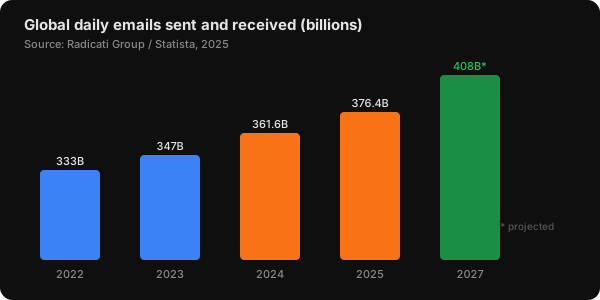
Email volume grows ~4% per year. At 376.4 billion messages per day in 2025, the signal-to-noise problem is structural, not personal. (Source: Radicati Group / Statista, 2025)
The productivity cost is severe. According to a peer-reviewed study by Gloria Mark, Daniela Gudith, and Ulrich Klocke at UC Irvine, it takes an average of 23 minutes and 15 seconds to fully regain focus after an email interruption (UC Irvine, 2008). When knowledge workers check email an estimated 11 to 36 times per hour, the cumulative attention cost dwarfs the time spent actually reading messages.
What we found: Users who let promotional email sit unmanaged for 90 days typically accumulate 500-2,000 unread messages in the Promotions tab alone. A single 45-minute cleanup session using the filter method below reduces that backlog to zero. The right filter structure prevents it from rebuilding.
How to Unsubscribe from Promotional Emails the Right Way
In 2025, the unsubscribe rate across email platforms nearly tripled: from 0.08% in 2024 to 0.22% in 2025, driven largely by Gmail's July 2025 rollout of one-click unsubscribe infrastructure (MailerLite, Email Marketing Benchmarks 2025, 2025). That's the fastest unsubscribe growth on record, and it signals that users finally have the tools to act on their frustration.
Here's the hierarchy that works, from fastest to most comprehensive:
Step 1 — Gmail's Manage Subscriptions Tool (Fastest)
Gmail's Manage Subscriptions view (launched July 2025) lists every sender Gmail has categorized as promotional, sorted by frequency. It's the quickest path to removing the noisiest senders first.
To access it:
- Click the hamburger menu (☰) in the top-left of Gmail web
- Select Manage subscriptions from the navigation panel
- Sort by Most frequent to surface the biggest offenders
- Click Unsubscribe next to any sender: one click, no external page visit
The one-click mechanism works via the RFC 8058 List-Unsubscribe header. You don't visit a landing page, you don't re-enter your email address, and you're not tracked for clicking. For senders that honor this header, you're removed within minutes.
The practical rule: Don't unsubscribe from everything at once. Tackle the top 10 noisiest senders, wait a week, then reassess. This prevents the regret-unsubscribe cycle where you remove a sender you actually read quarterly.
Step 2 — Manual Unsubscribe for Stubborn Senders
For any promotional email that slips through, scroll to the footer. CAN-SPAM requires every commercial email to include a visible, functional unsubscribe mechanism. Under the January 2025 FTC penalty update, violators face up to $53,088 per email (FTC / Hustler Marketing, 2025). Legitimate senders comply.
Look for: "Unsubscribe," "Manage preferences," "Email settings," or "Opt-out." If you don't see one, or if the link is broken, the sender may be violating CAN-SPAM. Report them to the FTC at reportfraud.ftc.gov.
Never click "unsubscribe" in emails from senders you don't recognize. Phishing emails sometimes use fake unsubscribe links to confirm your address is active, which results in more spam, not less. If the sender is unfamiliar, use the "Report spam" button instead.

How to Filter Promotional Emails Automatically
Unsubscribing handles the past. Filters handle the future. In 2025, 61% of people primarily check email on a mobile device (emailtooltester, 2025), meaning promotional emails land in the palm of your hand before you've decided whether you want them. Filters intercept before that happens. If you're also battling newsletter accumulation, the five methods in our Gmail newsletter clutter guide cover additional filter patterns that work alongside the ones here.
The "Unsubscribe" Keyword Filter (Catches 80%+ of Marketing Email)
Almost every commercial newsletter and promotional email includes the word "unsubscribe" somewhere in its footer. It's legally required in many jurisdictions. This one filter catches the vast majority:
In Gmail:
- Click the search bar → Show search options
- In Has the words, enter:
unsubscribe - Click Create filter
- Check Skip the Inbox (Archive it)
- Check Apply the label: → create a "Promotions" or "Marketing" label
- Check Also apply filter to matching conversations (retroactive cleanup)
- Click Create filter
Marketing emails land in your label folder. You read them on your schedule, whether weekly or twice a week, instead of every time one arrives. You're not deleting them; you're deferring them.
Add exceptions for legitimate senders: If a sender you need gets caught by the filter (for example, a vendor who signs their emails with a footer unsubscribe link), add an exception: has the words: unsubscribe + -from:importantsender.com. Exclusion rules are where the syntax gets fiddly — the Gmail filter generator writes the query, exceptions included, and gives you the setup steps to paste it into.
Sender-Specific Blocks for Repeat Offenders
For senders you want gone entirely:
- Gmail: Open the email → three-dot menu → Block [Sender]. Future messages from that address go directly to Spam.
- Outlook: Right-click → Block → Block Sender. The address is added to your blocked senders list.
- Apple Mail: Open email → Mail menu → Block Contact. Blocked messages move to Trash.
Blocking differs from unsubscribing: unsubscribing tells the sender to remove you from their list, while blocking tells your email client to ignore them regardless. Use both together for senders that ignore opt-out requests.
Here's how send frequency affects subscriber retention, based on 19 billion sends analyzed by Salesforce Marketing Cloud (2025):
| Emails sent per week | Avg unsubscribe rate | vs. low-frequency |
|---|---|---|
| 1-2 | 0.07% | baseline |
| 3-4 | 0.22% | 3.1x higher |
| 5+ | 0.58% | 8.3x higher |
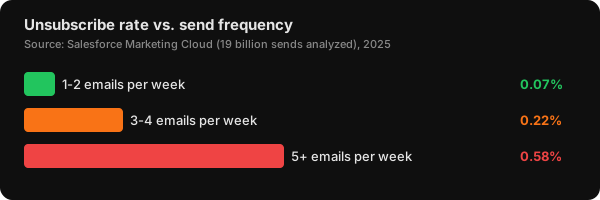
Brands sending 5+ emails per week see an unsubscribe rate 8.3x higher than those sending 1-2. Frequency is the single largest driver of list attrition. (Source: Salesforce Marketing Cloud, 19B sends analyzed, 2025)
What the data shows: The relationship between send frequency and opt-outs isn't linear. It's exponential above the 5/week threshold. There's a practical ceiling for how aggressively any sender can market before losing their list faster than they acquire it. For inbox management, this translates to a useful heuristic: if a sender mails you more than once a week and you don't open their messages, they've already crossed your personal tolerance threshold. Unsubscribe without guilt.
How to Stop Promotional Emails from Finding You in the First Place
Most people pick up 2-5 new commercial senders every month just through ordinary online activity: purchases, free downloads, and event signups (SaneBox, Unwrap Your Inbox 2025, 2025). The cleanest inbox defense isn't reactive; it's structural. Once you've cleared the backlog, the habits below prevent it from rebuilding.
Use a Secondary Email Address for Signups
Create a dedicated address exclusively for newsletters, offers, and any signup that isn't critical. When that inbox fills up, scan it on your own schedule, or abandon it and create a fresh one. Your primary inbox stays clean because your address never reaches marketing lists.
Gmail Plus addressing works similarly: yourname+shopping@gmail.com routes to your primary inbox but lets you filter by the plus tag. All messages sent to that address can be auto-archived with a single label rule. When a company sells or leaks your address, you'll know exactly which signup caused it. Generate a batch of them up front with the Gmail alias generator — it covers both plus-tags and the dot variations Gmail also ignores, so you have a distinct address ready for every signup.
Opt Out at the Point of Sale
When buying online or signing up for software, look for pre-checked marketing consent boxes. Under GDPR (in the EU and UK), these cannot be pre-checked; that's illegal. Under CAN-SPAM (in the US), pre-checked boxes are legal but the sender must honor your opt-out. Unchecking the box at signup is far faster than managing the fallout later.
Be Selective with Your Primary Address
Reserve your primary email for workplace communication, financial institutions, government services, and people you know personally. Everything else goes to your secondary address. This one discipline, applied consistently, blocks 80% of future promotional accumulation at the source.

What Are Your Legal Rights Against Unwanted Marketing Emails?
CAN-SPAM violations now carry a maximum civil penalty of $53,088 per email in the United States, effective January 17, 2025 (FTC, 2025). In the EU, GDPR fines reach up to €20 million or 4% of global annual turnover. These aren't theoretical numbers: France's CNIL fined Orange €50 million in December 2024 for sending ad emails without proper consent. Senders who ignore your opt-out request aren't just annoying; they may be breaking the law. For a broader look at how these rights fit into daily inbox management, see our complete email management guide.
What CAN-SPAM requires of every commercial email sender:
- A clear and conspicuous physical mailing address
- A functioning opt-out mechanism (link, reply address, or similar)
- Honor unsubscribe requests within 10 business days
- No deceptive subject lines or "from" addresses
- Clear identification that the message is an advertisement
What GDPR adds (for emails targeting EU recipients):
- Consent must be freely given, specific, informed, and unambiguous
- Pre-ticked boxes do not constitute consent
- You have the right to withdraw consent at any time
- Senders must process erasure requests within 30 days
Practical enforcement path: If a sender fails to process your opt-out within 10 business days (US) or 30 days (EU):
- Document the original request (screenshot the confirmation or save the email timestamp)
- Document the subsequent ad email you received after the deadline
- File a complaint with the FTC at reportfraud.ftc.gov (US), your national data protection authority (EU), or the ICO at ico.org.uk (UK)
- Consider forwarding the violating email to spam@uce.gov, which feeds the FTC's spam database
Most legitimate senders fix their process the moment you contact their compliance team directly, because the per-email penalty structure makes non-compliance economically irrational.
If you're on the other side of this — sending the marketing email rather than receiving it — the same rules are what the unsubscribe email generator is built around: it produces a compliant opt-out message and the matching List-Unsubscribe header, which is the mechanism CAN-SPAM and GDPR expect you to provide.
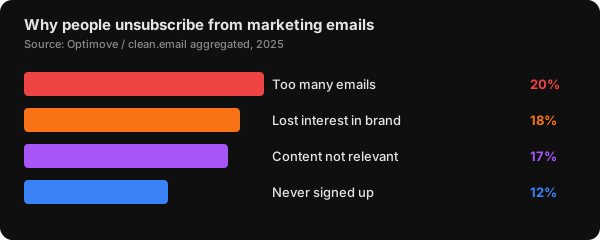
Frequency and relevance drive the majority of opt-outs: two factors senders control and routinely mismanage. (Source: Optimove / clean.email, 2025)
How Should You Manage Promotional Emails on Mobile?
In 2025, 61% of people primarily check email on a mobile device, and 59% of Millennials plus 67% of Gen Z scan their inbox on mobile first (emailtooltester, 2025). That means promotional email interruptions happen in your pocket, on your commute, and in the 10 minutes before bed. The mobile context changes the management approach significantly.
Turn off promotional email notifications. This is the single most impactful mobile change. On iOS: Settings → Notifications → Mail → disable notifications for your Promotions/Marketing label. On Android: Settings → Notifications → Gmail → turn off Promotions category. You still receive all messages; you just stop being interrupted by them.
Enable tabbed inbox on mobile. Gmail's Android and iOS apps support tabbed categorization. Once enabled, ad mail lands in the Promotions tab rather than interrupting your Primary feed. Check that tab when you're ready to browse, on your own terms.
Schedule a daily promo window. Rather than reactive checking throughout the day, schedule one 5-minute window (lunch, or just before you close work) to scan the Promotions tab. Everything that arrived that day gets read or archived in one pass. This batching approach turns 20 daily micro-interruptions into one intentional task.

How Do You Keep Promotional Email from Coming Back?
A one-time cleanup isn't enough. New commercial senders accumulate naturally: the average user picks up 2-5 new subscriptions per month through ordinary online activity (SaneBox, Unwrap Your Inbox 2025, 2025). The inboxes that stay clean long-term run a lightweight weekly maintenance loop, not heroic monthly purges. For a complete system covering every type of inbox overload, see our complete guide to managing your email inbox.
The 10-minute weekly system:
-
Monday, 5 minutes: Open Gmail Manage Subscriptions. Sort by Most Frequent. Opt out from any new sender whose name you don't immediately recognize, or whose last three messages you didn't open.
-
Friday, 5 minutes: Scan your Promotions label or tab. Archive anything older than 7 days without opening it. If you haven't read it in a week, you weren't going to.
-
Monthly, 10 minutes: Run
category:promotions older_than:30din Gmail search. Select all, archive all. This clears accumulated ad mail that survived the weekly passes.
This system keeps the unread count in your Promotions label under 20 at all times: a manageable backlog that won't trigger anxiety when you look at it.
For users managing high-volume inboxes, NeatMail handles the automation layer: bulk unsubscribe detection, auto-archive rules based on sender category and age, and AI-based priority labeling that ensures genuine urgent messages never get buried. The Pro plan ($9/month) includes custom labels, AI draft replies, and archive rules; the Max plan ($19/month) unlocks unlimited archive rules.
Frequently Asked Questions
How do I stop promotional emails without unsubscribing from everything?
Create a Gmail filter using the keyword unsubscribe in the "Has the words" field and set it to "Skip the Inbox (Archive it)" with a custom label. This auto-archives promotional emails as they arrive without you having to opt out one by one. You still receive everything; you just read it on your schedule rather than in real time. This catches roughly 80% of marketing email automatically (Gmail Help, 2026).
Is it safe to click unsubscribe in promotional emails?
Yes, if you recognize the sender as a legitimate business you've interacted with before. No, if the sender is unfamiliar. Phishing emails sometimes use fake opt-out links to confirm your address is active, resulting in more spam, not less. For unknown senders, always use the "Report spam" button in your email client rather than clicking any link inside the message (FTC Consumer Advice, 2025).
What happens if a company doesn't honor my unsubscribe request?
Under CAN-SPAM, senders must process opt-out requests within 10 business days. Under GDPR (EU/UK), they have 30 days. If they continue sending after those deadlines, file a complaint with the FTC at reportfraud.ftc.gov (US) or your national data protection authority (EU). Violations carry penalties of up to $53,088 per email in the US and up to €20 million under GDPR (FTC / EU Commission, 2025).
How do I prevent my email address from ending up on marketing lists?
Use a secondary address for any signup that isn't critical. Gmail Plus addressing (yourname+shopping@gmail.com) lets you filter by the plus tag and identify which signup shared your address. At checkout, always uncheck pre-selected marketing consent boxes. In the EU, pre-ticked boxes are illegal under GDPR, but they still appear on non-EU sites (ICO GDPR Guide, 2026).
Does reporting as spam actually help?
Yes, in two ways. First, it trains your email client's spam filter: every time you mark a sender as spam, your client learns to route similar future messages to your Spam folder. Second, Gmail's spam signals are aggregated across millions of users. If enough people report the same sender, Gmail may start routing that sender's messages to Spam globally for all users. Report rather than just archive when a sender is genuinely unsolicited.
How often should I audit my promotional email subscriptions?
The most effective pattern is a monthly light audit (opt out from anything you didn't open that month) plus a quarterly deep audit (run category:promotions older_than:90d and mass-archive). Users who do monthly audits report less than half the ad mail volume of users who only respond reactively to inbox overload, based on behavioral data from email management studies (SaneBox, Unwrap Your Inbox 2025, 2025).
Take Back Your Inbox
The math is straightforward: 121 emails per day, 76% of which don't require action, combined with a 23-minute refocus cost per interruption. That's not a minor annoyance; it's a structural drain on your working day. The fix isn't discipline or willpower. It's a one-time filter setup plus a 10-minute weekly maintenance habit.
Start with the fastest win: open Gmail's Manage Subscriptions and opt out of your 10 noisiest senders right now. Then add the unsubscribe keyword filter. Together, these two steps take under 15 minutes and cut ad mail volume by 60-70% before tomorrow morning.
For anyone managing 100+ emails per day, NeatMail automates the filter set: bulk unsubscribe, auto-archive rules, AI priority labeling, and a Telegram integration for genuine alerts, all in one workflow that keeps your inbox lean without a weekly time investment.
Related reading
- How to Manage Your Email Inbox: Complete Guide 2026 — full system for reducing email anxiety and organizing with Inbox Zero
- How to Stop Newsletter Clutter in Gmail (2026 Guide) — five proven methods including Gmail's Manage Subscriptions and filter chains
- Inbox Zero With 100+ Emails a Day — whether a clean inbox is achievable at high volume, and the system that makes it work
Sources
- Radicati Group / Statista, "Email Statistics Report 2024-2028," retrieved 2026-06-27, https://www.omnisend.com/blog/email-marketing-statistics/
- cloudHQ, "Workplace Email Statistics 2025," retrieved 2026-06-27, https://blog.cloudhq.net/workplace-email-statistics/
- Clean Email, "Email Industry Report 2025-2026," retrieved 2026-06-27, https://clean.email/blog/insights/email-industry-report-2026
- SaneBox via MailOver, "Email Overload Statistics 2025," retrieved 2026-06-27, https://mailover.ai/blog/email-overload-statistics.html
- Gloria Mark, Daniela Gudith, Ulrich Klocke, "The Cost of Interrupted Work: More Speed and Stress," UC Irvine, 2008, https://threadly.live/blog/email-management-statistics-2025/
- MailerLite, "Email Marketing Benchmarks 2025," retrieved 2026-06-27, https://www.mailerlite.com/blog/compare-your-email-performance-metrics-industry-benchmarks
- Optimove / clean.email, "Email Subscription Fatigue Statistics 2025," retrieved 2026-06-27, https://clean.email/blog/insights/email-subscription-fatigue-statistics
- Salesforce Marketing Cloud via Amra & Elma, "Email Unsubscribe Rate Statistics," retrieved 2026-06-27, https://www.amraandelma.com/email-unsubscribe-rate-statistics/
- FTC, "CAN-SPAM Act Compliance Guide, penalty updated January 2025," retrieved 2026-06-27, https://consumer.ftc.gov
- ICO, "Guide to UK GDPR," retrieved 2026-06-27, https://ico.org.uk/for-organisations/guide-to-data-protection/
- emailtooltester, "Email Usage Statistics 2025," retrieved 2026-06-27, https://www.emailtooltester.com/en/blog/email-usage-statistics/
- Hustler Marketing, "Email Marketing Compliance 2026," retrieved 2026-06-27, https://www.hustlermarketing.com/email-marketing-compliance-in-2026-gdpr-can-spam-privacy-laws-explained/